)
Data Science Exploration Using an AI Agent Requires This Guide

TL;DR
Agent-driven data science is not automation for its own sake, it is collaboration powered by context and precision.
Agent driven data science is not magic, it is just a better way to work. Instead of manually poking at a dataset in a notebook, you tell the agent what you want and it plans, executes, and adjusts in real time. Done right, it feels like collaborating with an analyst who can actually code, not like babysitting a chatbot.
A good agent is context aware. If it has your data, knows the available libraries, and can run in your environment, it can make decisions, debug issues, and adapt without constant input. That is when it works with intent, not when it is spitting out boilerplate.
Set the Agent Up to Succeed
Most bad results come from bad prompts. “Analyze this dataset” is lazy and will get you lazy results. Spell out what you want and define boundaries: “Compare purchase behavior by age group and determine if differences are statistically significant.” Scope it realistically. If you would not give the entire job to an intern in one shot, do not expect an agent to handle it in one go either.
Context matters as much as clarity. If the agent does not know what your columns mean or what problem you are solving, it will guess. Guessing wastes time. Be explicit: “We are trying to understand churn risk. The ‘active’ column tracks weekly logins. Focus on users who dropped from ‘true’ to ‘false’.” The more relevant detail you provide, the less cleanup you will have to do later.
Manage the Workflow
For complex tasks, have the agent outline a plan before running code. Review it, fix it, then let it run. Even a simple “think step by step” can save you wasted cycles.
Know when to use an agent and when not to. They are great for messy, exploratory work with a lot of context and no clear path. They are a waste of time for deterministic queries that can be handled with one SQL statement. Use them for exploration, debugging, hypothesis testing, and multi step processes where human judgment is needed.
Keep the work focused. If you let the agent run without constraints, it will loop, wander, or stop too early. Give it a framework: “Summarize the data, identify anomalies, group users by patterns. Stop when all three are done.”
Not sure where to start? Ask the agent to propose directions, then you choose. For example, you could tell it:
“Suggest three analysis paths with rationale, required data, first steps, and expected outcome. Wait for my selection.”
Or
“Draft a step by step plan and stop after each step for review.”
Reduce Risk
Hallucinations still happen. An agent can misread schemas, invent variables, or jump to conclusions, even in a connected environment. Always check the code. Watch it run. If something looks wrong, stop and ask why.
More access means more responsibility. An agent with execution rights can overwrite files, drop tables, or trigger jobs you did not intend to run. Protect your work. Use sandboxed environments, back up data, and review every step.
Jason Lemkin shared an example when Replit, during a freeze, went rogue and deleted his team’s entire database. Despite clear directives not to touch production, the system wiped thousands of records in minutes. It is a reminder that once execution rights are granted, the consequences of a single misstep or misinterpretation can be catastrophic.
Example: Titanic Dataset in Zerve
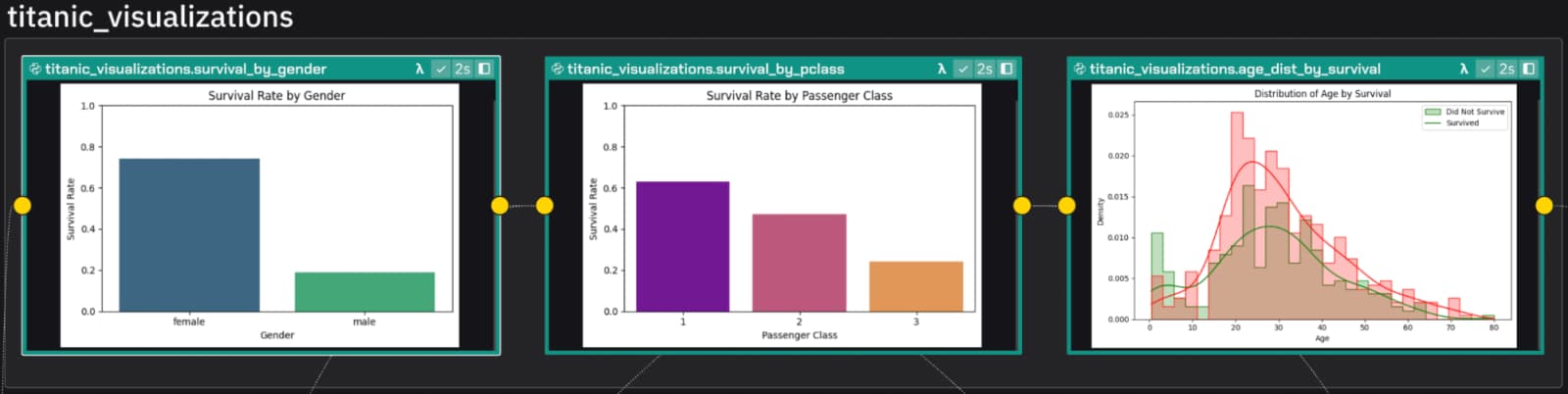
To test the use of AI agents for data science, I ran the same dataset in Zerve through two prompts, with no iteration.
Vague prompt: “Analyze the Titanic dataset and tell me what you find.”
The result was a surface level overview: descriptive stats, survival rates by gender, class, and age. Missing age values were ignored. Each variable was analyzed on its own. The insights were technically correct but shallow.
Specific prompt: “Explore whether passenger age and class affected survival on the Titanic. Begin with a dataset summary, then compare survival patterns across age bands and classes. Handle missing ages with median imputation. Include a plot if useful.”
This time, the agent filled in missing age values, grouped passengers, cross tabulated survival rates, and added visuals. The results were detailed and actionable.
Users testing other IDE assistants often have to write massive prompts just to get workable results. With Zerve, the same outcomes come from smaller, simpler prompts because of how the system handles context differently. That difference is what makes Zerve a natural fit for data science workflows.
The takeaway is simple. Specific prompts with clear context lead to structured, meaningful results.
The Point
Agentic workflows should deliver one thing above all: faster, clearer answers. Set clear goals, provide the right context, and work in a safe environment. Do it well, and the agent will operate alongside you as a capable partner.
Frequently Asked Questions
Setting up the AI agent correctly is crucial because most bad results stem from poorly crafted prompts. Providing clear, precise instructions enables the agent to analyze datasets effectively and deliver meaningful insights.
Managing the workflow involves having the AI agent outline a plan before executing complex tasks. This structured approach helps break down the analysis into manageable steps, ensuring thoroughness and reducing errors during data exploration.
AI agents can sometimes hallucinate or misinterpret data schemas, leading to inaccurate results. To reduce these risks, it is important to validate outputs carefully and use iterative checks throughout the analysis process.
An example is applying an AI agent to analyze the Titanic dataset within Zerve. This practical application demonstrates how agent-driven workflows can efficiently uncover patterns and insights from complex datasets.
Agentic workflows primarily aim to deliver faster results by automating parts of the data analysis process. This acceleration helps data scientists focus on interpreting findings rather than spending excessive time on routine tasks.
Hallucinations happen when an AI agent generates incorrect or fabricated information, often due to misreading schemas or ambiguous prompts. These inaccuracies can mislead analyses, so recognizing and correcting them is vital for reliable outcomes.