Optimizing EV Charging Stations: A Live Code-Along in Zerve
January 22, 2026
Join Zerve co-founders Greg Michaelson and Jason Hillary for a fully interactive, hands-on code-along where you’ll build an end-to-end optimization project from scratch using Zerve’s new notebook view. You’ll write code with us step by step, ask questions as you go, and learn how to model a synthetic city, generate EV charging demand, define an optimization objective, and use heuristic search to place charging stations efficiently. This session is designed for active participation: follow along, experiment, and get real-time guidance from two experienced PhD data scientists. Everyone who attends gets free Zerve credits so you can continue exploring and applying these techniques long after the workshop. Key takeaways from attending this event:
How to translate a real-world planning problem into an optimization objective (for example, constructing a weighted distance function and defining constraints like service radius.)
How to implement and iterate on heuristic optimization methods (such as k-medoids–style search) to improve facility placement without relying on packaged solvers.
How to build and visualize an end-to-end optimization workflow in Zerve, including generating synthetic spatial data, evaluating solutions, and comparing baseline vs optimized layouts.
Get ready to have some fun!
0:10
Welcome along. Welcome along uh to our first event uh in our 10th uh birthday
0:17
year. H I can't quite believe it actually. Data Science Festival has been running for 10 years. Um and man, we've
0:23
got a year uh planned for everybody. and you lucky people are are the are the people that have joined us on the very
0:29
first event of the of this year for us. So, thank you very much for being with
0:34
us today. And the other thing I'm going to call out is um like it sets your
0:40
intention uh for 2026. Um so I was chatting with the team at Zerve last
0:45
year and we had a super successful vibe coding session with them. Um, and they
0:50
were kind of like, what can we do in 2026 to to really help the community, to
0:55
support the community and and actually get 2026 off to the best start possible.
1:00
Um, and they were very keen to do an event as early as possible in the year, uh, which is what we're doing uh, right
1:07
now. Uh for those of you that were with us in the first session we had Greg with us uh who's joining us again today and
1:13
man it was clear in that session knows his stuff very passionate keen to get hands on keen to share his knowledge and
1:20
keen to get everyone working with him and he's roped in Jason uh one of his co-founders uh to help us out today. Um
1:28
in terms of that um I'm going to call out uh like Zerve uh I mentioned it at
1:33
the start um they are building they are innovating uh they are making waves in
1:39
the data community um and they really get the data community uh which first and foremost for me I'm going to show my
1:45
age but I'm a little bit old school I I was around in the late 90s early 2000s when the internet was kicking off and it
1:52
really was this ecosystem of supporting um and Zerve almost embody that now with
1:57
this AI wave and uh where we're going with data
2:04
on and welcome us uh welcome them sorry um give us some clapping emojis or
2:10
something someone would they this is the round of applause come join me on stage uh everybody
2:20
was that that is the that was the queue that was the queue where's Jason come on Jason
2:26
I'm hoping my Internet's not playing up, but it seems to be okay. Can you both hear me? Okay. Uh yes, you cut out for a second, but uh you're
2:32
loud and clear now. We're we're there now. We're there now. I was waffling on about the start of the internet and the dawn of time, but uh
2:39
that that is not why we're here. We're here to build. Um and just the final piece I'll say for those that have
2:44
joined us today and at day we spend loads of time uh working with different companies and the persona that they're
2:51
really looking to hire at the moment is builders. Um, so they're looking for
2:56
people that can build [ __ ] and make stuff happen. Um, and that is what the Zerve platform uh is all about. Um, so
3:04
we're going to drill into that today and couple of little bits of life admin. Um, it's an interactive session. Uh, so Greg
3:11
and Jason will explain more just as we get going what that looks like. Uh, they'll talk you through the format. Uh,
3:17
they'll talk you through the problem uh, and where we'll be going for it. Um, they are looking for it to be
3:22
interactive. Uh, so by all means, if you do have a question, stick it into the Q&A, stick it into the chat, uh, and
3:29
Greg and Jason will be answering them as we go along. Uh, and like you, I I'll be following along behind the scenes, uh,
3:36
making the most of, uh, of this time. So, and what I'll do, uh, Greg, I'll
3:41
stop sharing now, and if it's okay with you guys, I'll maybe get one of you to
3:47
share, and then we can, uh, take things from there. Um, just as you're doing
3:52
that, I'm going to quickly open the chat and see where we are. Um, lovely. We've got a few uh a few people in the chat
3:58
already as well. So, I'll give a few shoutouts just as you're getting things uh up and running. So, Zahabas, Zahed, I
4:05
recognize your name from last time. So, thank you for joining us again. That's absolutely awesome. Jess, hey everyone
4:11
from rainy Milton Kees in the UK. It is raining in Milton Kees, so we uh we don't need that. Diddier joining us.
4:17
Hello all. Um, Sanjie, welcome. So, please do. It's interactive. Go with the
4:22
emojis. Uh go with the chat. Um and yeah, thank you all for for being with
4:27
us today. Um in terms of that, Greg, obviously I can see you've shared your screen. Uh that all looks great. Are you
4:33
guys happy if I duck out and uh leave you to kick things off? Yep. You got to follow along with us. We
4:39
might call you out at any minute. I'm on it. I'm on it. Good luck, lads. Have a good one. All right. Sounds good.
4:45
Jason, how are you this morning? Oh, great. No, thanks. Um thanks, Greg. Um, yeah, really looking forward to to
4:52
this. It's not raining here in Ireland. So, um, yeah. And uh, yeah, Jess in
4:58
Milton Ke is like, "Yeah, sorry to hear it." How are you, Greg?
5:03
Not bad. 6 a.m. bright and early, ready to do some ah, a bit of coding. Yeah. Yeah.
5:09
No better time. It's easier easier now at 6 a.m. than it ever was when you have an agent kind of like uh, yeah, kind of
5:15
code along with you. Anyways, all righty. Let's see here. All right,
5:20
let's So, everybody could should go on to app.serve.ai and I'll just sign out here. You should
5:27
come to a screen that looks something like this. And this is a live kind of everybody get on the action kind of
5:33
codealong type thing. Uh, and so everyone should uh feel free to if you
5:39
haven't already signed up to go to this sign up button. You can sign up with Google. Uh, it's free, you know, there's
5:44
no no cost to it, nothing like that. Uh so go ahead and get signed in or if you already have signed in then uh then go
5:50
ahead and log in. And I'm just going to log in with my Google account here and show all of my other emails and such.
5:56
But uh anyway, and I will go ahead and take our challenge for today. So what we're going
6:01
to be doing is uh we're going to be simulating some or generating some
6:06
synthetic data and that will represent like demand for electric vehicle
6:13
charging. And then we're going to write a little optimization program to try and
6:18
figure out where we should put our charging stations in order to serve all
6:23
the people that drive these uh electric cars. So, um there is uh an agent in
6:29
Zerb that we're going to be using. So, I'm going to go ahead and put I just copy all this text here and put it in
6:36
the chat. There we go. So, that's what we're going to try and solve today. Um,
6:42
where should a city place EV charging stations to best serve demand? Uh, we'll model the city as zones with locations
6:48
and EV charging demand given a limited number of charging stations so that we
6:53
can place those charging stations uh so that high demand zones are served efficiently and travel distance to the
7:00
nearest station is minimized and coverage constraints uh are respected.
7:06
So what what is the uh say max service radius for a particular um
7:12
uh for a particular charging station. Uh so we're going to try and build it from end to end. See what happens. I've got one baked already uh in case of disaster
7:20
because you know live coding sessions are always a little uh uh you know risky. But uh you know I like I like
7:26
working without a net. So let's uh let's give it a go. Jason, you ever driven an electric car?
7:32
Uh never. Um no. They wouldn't get me very far. It's like um yeah, I don't I I
7:37
live on the the west coast of Ireland, so it's like infrastructure isn't as good. So, I couldn't get from where I
7:44
live to Dublin and back with the best technology just yet, I think. So, um uh I I I'm up for it, but it's like I'm a
7:51
I'm a little bit away, I think. Uh wait, wait. How how many miles are you from Dublin? Uh 200
7:59
Yeah, bit more than 200, I think. Oh, jeez. You could make it to Dublin and then charge Dublin.
8:04
Maybe. Maybe. It's like Yeah. And you, Greg, have you ever driven one?
8:09
Oh, yeah. Yeah. Yeah. I had a Tesla a few years ago. It's a It's a remarkable car. Like, it it it's the coolest, most
8:17
fun thing to drive you've ever you could imagine. Yeah. They're super cool. I remember the first time I was in one, it was just like the It's very futuristic with the
8:24
the consoles. a lot a lot of kind of um of the other kind of card makers have
8:30
kind of moved to that kind of like tablet kind of like entertainment kind of inter uh system in the middle now.
8:36
Mhm. And the the best thing about them is the acceleration because they're just so zippy, you know what I mean? There's
8:42
no delay when you push the gas off the line before you're going, which is just incredibly fun. So anyway,
8:49
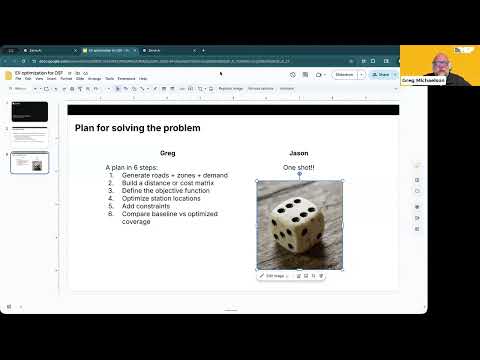
we're going to we're going to solve this problem. And Jason, you and I are going to do it separately. Okay?
8:54
And I'm I'm going to break it into six sections here and uh try and kind of
9:01
guide our agent to solve the problem by sort of breaking down the problem into steps and saying, "All right, do this.
9:07
Now do this. Now do this. Now do this." Uh and you in the background are just going to oneshot it. You're gonna you're
9:12
gonna come up with one prompt and give it to the agent and just see if
9:17
it can do all the things. Okay. I'm I'm I'm gonna start building my prompt now. So, I'm going to start by
9:24
copying the one that you put in the chat. Yeah. And okay, we're going to check in with you at the
9:30
end and see how the agent did because I actually I I sort of it's kind of an open question in my mind whether it's
9:36
better to just sort of oneshot it and see what the agent does or if it's better to kind of guide it and give it
9:42
some direction as to uh you know how how to structure the problem, how to do all
9:48
the things. Yeah, I feel well with this particular one, I think it might end up being uh I
9:54
think a few steps is probably better than one step, but it's it's my gut feel. So, I think yours might end up a
10:00
bit better than mine. When it can synthesize the data at the start, I think it's maybe levels the playing
10:05
field a little bit. It's like, you know, if it has to look at the data for the very first time and you try to like tell
10:10
it exactly what to do in a prompt, um that could be tricky. But, uh we'll see. We'll see who wins.
10:17
Okay. Well, I'm excited about it and I actually have high hopes for the oneshot. Uh so, we'll we'll cross our
10:24
fingers there. Um let's see. Is uh anybody monitoring the chat? Is everybody getting logged in and accounts
10:31
being created and something like that? Uh let's see. Do we need any promo code preserve? We don't need a promo code
10:36
right now. You'll start with five free credits, which should be more than enough for uh what we're going to do
10:42
today. So, no credits needed. Yeah. Well, Dave from the chat actually gave me some good uh good good life
10:48
advice in general. There's a char more charging stations per square kilometer in Ireland than in England. And there's
10:55
uh he he got around the whole of Ireland in an electric motorcycle. So I have no I have no excuses.
11:02
Wow. Yeah. No, I had an electric motorcycle back a few years ago. I had the Harley-Davidson electric motorcycle.
11:09
That thing was insanely fast. It was scary fast and it was so fun to ride
11:14
around on. What was the um What is it? Is it a It's a chopper then. Is it Is it If it's a
11:20
Yeah. Yeah, it was it would do 0 to 60 in like two and a half seconds or something. Oh, it was absurdly fast. It was so
11:27
dangerous. I'm uh I'm glad I got rid of it. And also, I've been kicking myself for getting rid of it since I did.
11:35
All right, so uh let's see. I saw a question in the chat about what do I do now now that I'm now that I'm logged in.
11:40
So, uh let's see. So, this it should take you to this screen once you get logged in. And we're just going to go
11:46
over here to create a new project. And we're going to call it EV uh charging
11:51
live code along. We'll create a new project
11:56
and I'll just do like a quick walkthrough uh that kind of describes where we're at so that everybody kind of
12:02
gets a good feel for what the app looks like and where all the buttons are and and that sort of thing. So, uh first
12:09
things first, you've got a little share button here. So, if you do want to invite other people to participate, uh
12:15
Zerve works a lot like a goo Google doc. If you've got multiple people kind of involved, uh you can see, you know,
12:20
where they're at, what they're coding, what they're doing, all that kind of stuff. Uh they can see your stuff, you can see their stuff, and and you can
12:26
collaborate all in the same environment. Uh you can code in Python, R, uh SQL, so
12:32
on. We'll be doing all of our stuff in uh Python today. Uh so that'll be fun.
12:39
Um and then you've got uh a little notebook style view here. So, if you
12:44
wanted to start coding from scratch, you could, pardon me, you could click on Python
12:50
here and it would create a little cell where you could start typing code and all that sort of thing. Uh, but we're
12:56
going to let the agent do most of the work today. Uh, let me just walk you through kind of where things are over here. So, this is your file system is if
13:03
you have any any files that you wanted to upload. We don't have any files today because we're going to generate synthetic data. Um, you got a search
13:09
utility for like finding text, that sort of thing. Um, this is if I need to add any libraries or packages. We won't for
13:16
today, I don't think. We might, if we were doing something a little more complex, we might have some mapping
13:21
tools that we would need. So, maybe we'd use this geospatial environment. Um, but like I said, you can add any kinds of
13:28
packages or anything like that that you need. Uh, if you wanted to attack this problem from another perspective that
13:35
would require uh additional dependencies or anything like that.
13:41
Um there's compute settings. This is for uh you know default settings around like
13:46
what type of compute to spin up etc when you uh when you're executing code. Uh
13:51
global imports is for uh where you would have code that you want to run before
13:56
each block. Uh assets is for like connections to databases and reusable code and stuff like that. And then of
14:03
course we can sync to GitHub and and all that sort of thing. We won't be using GitHub today, but uh that's where that
14:08
is. So, that's just a quick tour of what's going on here. The real action is happening over on the right side, and
14:14
that's where the uh the agent is going to do its work. And so, Jason, have you kicked off your your one shot yet?
14:21
Not quite. I'm mid mid mid-prompt. Ah, mid-prompt. So, I'm carefully crafting that.
14:26
I'm about 10 seconds away. Yeah. Okay. Awesome. Uh, okay. So, like I said, we're going
14:33
to try and optimize these these charging station locations. And the first uh first thing I want to do here is to
14:40
generate roads and zones and demand. So let me jump to this prompt here. So I'm
14:48
going to say to the agent, create a syn simple synthetic map with 20 to 30 zones. Give each zone a coordinate and a
14:55
demand weight representing EV charging need. Visualize the zones on a scatter
15:00
plot. So we'll get going there. Uh now the way that Zerve works uh we're
15:07
going to start as soon as the agent starts working here we're going to be able to see uh not just the code that
15:14
it's generating. So here's its plan uh and we can it's going to generate a synthetic map between 20 30 zones uh
15:20
just like I asked it to. Uh and it will start putting code here in the notebook
15:25
and that'll appear in two ways. Uh, so I've got this canvas view opened up here. And the canvas view is going to
15:30
show us a a graph style view, a DAG if you're familiar with that terminology. Uh, and so here's the first block. Uh,
15:38
and so we're setting a random seed. Okay. 20 25 zones, that sort of thing.
15:43
Uh, and it's executed this code. Uh, okay. Okay. And there there we go. So
15:49
here's our here's our map. So this if this were real life then maybe these would correspond to uh you know cities
15:57
or neighborhoods or or you know locations where there are like shopping
16:02
malls or something like that. Uh you know so this would be a map in real life but here it's just a coordinate system.
16:08
Uh and right now we're not going to be looking at like roads and fixed routes
16:13
and stuff like that. This is just strictly a uh a system where we're
16:20
uh you know your distance is as the crow flies. So it's a it's a simplified optimization to be sure. That looks
16:27
pretty cool though, huh Jason? It looks very cool. It's like yeah the um yeah. So my my is now in the planning
16:35
stage and it's starting to kick off its its work. But this looks uh very good. So, uh, we've got our kind of the the
16:42
starting point of our of our data, and then it's, uh, we have to figure out
16:48
where's the best place to put the the stations. Yeah, the charging station should should
16:53
go, uh, in in a few different places. I think we'll maybe do three charging
16:59
stations and see where the optimal location for them is. Okay, very good. Um, but you can you can see how the colors here represent the demand weight
17:05
and sort of the size of the dots. Uh, so the darker the dot and the bigger the dot, the more the demand.
17:13
Greg, just just to jump in, Zahed Abbas has been in the chat just asking if you would mind pasting your prompts
17:19
into the chat and I think they'll be able to people at home be able to copy and paste as they go, which I think
17:24
might make it very interactive. So, got it. I'll get out of the way. There's the there's the first one that I used.
17:32
Uh Jason, um maybe we'll hold your oneshot in in reserve until the end. Okay. Okay. Yeah, sounds sounds okay.
17:40
Actually, you know, should should we paste it now or should we hold it paste it at the end? Yeah, I can I can paste it in. Everybody
17:45
can do the same and they can make twe tweaks to it and see do they get the the same results or different results? Um so
17:52
in the let me just copy make sure and switch it to everyone.
17:57
Uh yeah. So, uh, I'm drinking a fresca this morning.
18:05
Here's my oneshot prompt. So, uh, I cannot copy and paste it.
18:11
Oh, I could I could paste. Why not? Uh, Zahed, is it?
18:17
Oh, sorry. Oh, yeah. Highlight and click copy. Yeah, there we go.
18:26
Yeah, the dot dot dot. If you click the dot dot dot next to the post, then the copy button appears and you can copy it
18:32
that way.
18:38
So, my one has now kicked off and it is
18:43
generating data and I have a couple of plots. I wonder if participants can't copy
18:50
paste.
18:56
Oh, yeah. So, David is looking into us.
19:02
Okay, Dave's looking into it. All right. Um, so we'll we'll go ahead
19:07
and keep keep trudging along here while the the issues with the chat are sorted out. Um, but let's see here. So, looks
19:16
like we're using pandas and numpy and mapplot lib, which is standard. I think that's what you'd you'd always do.
19:22
Yeah. And we are generating demand weights uh
19:27
using uh an exponential distribution sensible
19:32
um and rounding and so on. And then we are using coordinates. Where
19:40
do we do those? Oh yeah, these are just uniformly distributed. So your x and y coordinates are uniformly distributed.
19:47
and then we're plotting those guys in this map. Okay, so we've got our our
19:52
data set of demand ready and now we're going to go on to building a distance or
19:58
a cost matrix. So we're going to try and compute uh the distance between each of
20:03
the zones. And so here's my prompt. Compute the pair-wise distance matrix
20:10
between all zones and return it as a data frame and also visualize it as a
20:15
heat map. Let me jump into the chat and paste this guy here. Hopefully we'll get that issue
20:24
sorted where you can't copy paste. Yeah, my my my heat my heat map looks
20:29
not heat map but my distribution looks somewhat similar. Uh oh, really? Okay. So, a few more dots. It put in a city
20:36
center, commercial areas, suburbs, rural kind of like kind of like created different sections like that. So I'm not
20:43
sure if it's going to make demand based on like uh like simulate populations based based based on it. So it might be
20:49
some somewhat similar though I'd say. Okay. All right. I see somebody's put a
20:56
uh a Google doc in here. And it looks like we might be able to paste into that
21:03
Google doc. Oh, very good. Uh except my computer is losing its mind
21:09
here. Okay, here we go.
21:15
You know, one thing that people could try, uh, which I've never actually tried before, would be to, um,
21:23
copy the screenshots and just paste the images in and see if the the agent could
21:29
work with an image of the uh, of the uh, the prompt.
21:35
Somebody wants to play with that, that might be fun. Um, Jason, can you go in into that Google doc that somebody just pasted in
21:41
the chat? Yeah, I've opened this here and I'll copy in.
21:46
There we go. Uh, okay. So, we have a second uh second
21:52
piece of code here. And here's my my heat map. So, this is the distance matrix between each zone. Um, so if this
22:00
if this works like it always does, then each zone appears as a row and as a
22:06
column. Uh and so this guy here, this zone and this column, this would be
22:11
zero. Uh because there's no distance between a zone and itself. So that's why your diagonal column uh looks like it
22:18
does because these things are are very very close to each other. And the more yellow it is, it looks like the further
22:24
apart they are. Uh and so zone number eight is pretty far from zone number 11.
22:32
Uh so uh that that's uh our heat map. So that's that's good. That's what we asked
22:38
for. How's yours going, Jason? Uh, good good. I've got a couple of visualizations. It's done some like uh
22:45
extra kind of like exploration of it. It's now doing optimization. So it's um trying a few different approaches. It's
22:51
trying linear linear programming and it's also looking at
22:56
Oh, it's already already ahead of the game. Uh yeah, there's no stopping it. It just keeps going. So I I told you to do it in
23:03
one one shot. So it's like uh met a good few tickets. So it's kind of in the in the yeah in the phase where it's now
23:10
like uh trying to do some of the optimization. Gotcha. All right. So as we're building
23:15
here, this gallery button is a pretty useful place to kind of see all your results. So you can kind of scroll
23:21
through all the different plots that are created and that appears right here uh in your canvas view. So you may have
23:28
that canvas view hidden uh and if you do then you know you can always turn it on by clicking over here. But uh that's how
23:34
that guy works. Are you getting the uh prompts pasted into uh so I I requested access. I think
23:42
David is in there now as well. So might be able to copy him in. Gotcha. That's perfect.
23:49
All right. We're going to So we've created our roads and zones and demand and we built our distance matrix and now
23:55
I'm going to ask it to define the objective function. uh and that is basically like the the distance from
24:04
each zone to its nearest station. Uh and so the prompt that I'm using here says
24:09
define an objective function for facility placement. Uh given k charging
24:14
stations uh I think we'll probably set that to three. Uh calculate the total weighted distance from each zone to its
24:21
nearest station. Make the function reusable. So uh that is the prompt that I'm giving
24:28
it. And let me see here.
24:34
So, it's got a facility placement objective, a reusable objective function
24:40
that takes Kstation locations and calculates total weighted distance from each zone to its nearest station. Now,
24:46
Jason, how would you tackle this problem? Um, what what method do you think you'd use if you were going to
24:52
tackle this problem without the agent? Uh, I'm not 100% sure. There's a couple
24:58
of like um it is like a classic kind of like optimization problem. Um so
25:05
uh there's a package called uh pulp I've seen for some of these kind of things that um uh I forget exactly the name of
25:14
the algorithm that's used. Let me just Google it. It's the one that kind of springs to mind that one that I'm I might Google to see if it's like useful
25:21
in this case. I've never heard of pulp. I think that's the name of the package.
25:26
uh uh package uh I could be the completely wrong one.
25:32
So it's uh drop in the chat if you if any of you are familiar with uh with optimization
25:39
methods what kinds of approaches you might take uh and then we can prompt the agent to try them if uh if you have some
25:45
ideas. Oh the third prompt uh it is right Whoops here there's the third
25:53
prompt. Uh yeah. So it's linear programming. Oh yeah. Mixed mixed integer
25:59
programming. Oh, okay. We've got pulp and groby.
26:05
Okay. Oh, I've never heard of the second one. Yeah, me neither. I've never heard of
26:10
either one, but I'm kind of a hack. Jason, you're actually a serious technical person.
26:15
I a bit of a hack when it comes to this sort of thing. I'm I'm going to try and make a just for
26:22
I'll send a second prompt after and I'll be I'll make an an in second envir I'll make a new environment with those
26:28
packages installed and then ask it to like see what it can do with Grov.
26:34
Okay. Uh all right. So I'm going to go to the next prompt here and I'm going to say
26:41
implement a K midoids or uristic search to choose the optimal K starting loca
26:48
starting location K charging locations uh that minimize the weighted distance
26:55
objective start with K equals 3 and show the chosen zones. So we'll give that a
27:00
go and let me jump over to the chat and paste that one in there.
27:07
Okay. Pulp is also Google O tools is an optimization package in Gorobi as well.
27:14
Okay. Okay. Very cool. Yeah. Never heard of any of those. So I I picked this sort of like little
27:20
exercise here because it's something that I don't have much knowledge about. I haven't really done much linear programming or optimization like this at
27:26
all. Uh my PhD is in statistics so you know we we just do like t tests. We
27:32
don't really do uh real programming. Uh but that's the great thing about working with agents. I found that uh before the
27:40
coding agents kind of came out that I was very sort of hesitant or intimidated
27:46
I guess by a problem that was new that I hadn't really uh had exposure to in the
27:52
past. Uh and so I'd feel like well I need to do a lot of research. I need to do a lot of reading and it's going to take a long time to kind of figure out
27:58
how that works. And so it would like prevent me from trying new things sometimes.
28:04
But with the agents, you can just ask it for what you want and it'll sort of like it'll even explain what it's doing uh to
28:10
you. Uh and so it looks like the the one thing that I've started doing was um it's like kind of like the
28:18
way the people kind of like vibe code with like apps and things like that. I just kind of like find APIs that I'm
28:23
interested in and I'll put a few of those into a project if I think there's like something interesting you can find them both. And there's like no like um
28:32
there isn't the friction of like having to learn the packages or read the documentation anymore. That kind of side
28:38
of it is like vanished with like the agent. So it's like you can kind of start to do uh yeah test out new
28:43
projects and domains. So it's like not even just like technical things but like access to to data would have been like
28:49
uh something I never would have taken the time to learn a new API data source but that's kind of like uh super super
28:56
easy to to do now. But your chart is looking very cool up top there, Greg. Yeah, we seem to have some performance
29:02
comparisons cooking here. So, uh, we did the, uh, the K meids optimization and it's chosen these three spots for the
29:09
charging stations. Uh, and so, you know, that that's interesting. And we've got a
29:16
33% Did I say 33%. Yeah, 33% improvement uh,
29:21
over just random placement, which I suppose is good. So, that's a good start.
29:27
So, yeah. I mean, the other day my son was working on a project. He's he's into 3D printing. Uh, and he's like, "Hey,
29:34
Dad, I'm having trouble getting these corners rounded on my 3D printing uh uh
29:39
file." And I f my first reaction was uh well, I have no idea how any of that
29:44
works or any what those file types are or how to use any of the software or anything like that. But then I went,
29:49
wait a second, I have a coding agent and I could just generate that file uh from scratch. Uh, and so I did. It was it was
29:57
pretty cool. We uh we laid out the the little elements of his his design and then asked it to round the corners and
30:02
boom, I had a a 3D printing file and I knew nothing about 3D printing. So I did
30:08
it all in serve. It was spectacular. So that's unreal. Yeah. I I love being able to sort of like tackle problems that I previously
30:15
wouldn't have attempted. Yeah. Just because the way the agent does its thing. Oh, that's very cool.
30:21
All right. So let's see. Now let's add some constraints. Uh,
30:26
so the next prompt says add constraints to the optimization uh a max service radius where no zone can be more than uh
30:34
r units from a station and update the solver to enforce the constraint and
30:41
rerun for k= 3. So let me open the prompt here. So, we're adding a
30:46
constraint to our optimization here. And hopefully what I'm imagining will happen is that it'll draw the the this same
30:54
image, but there'll be radiuses ser service radiuses around each thing. So,
30:59
it might end up having to move the charging stations. Uh might uh might end up, you know,
31:06
doing its own doing something different. So, it's always uh exciting working with the agent to see if it see what it will
31:12
do. How's yours looking, Jason? Uh it's it's um looking good. It's uh it's
31:18
finished that task. So I'm going to ask it to what's the next coolest thing we can do and do another thing. So I have
31:25
uh eight eight charts uh three different models trained uh an
31:31
idea of what the maximum coverage is a compar. Yeah, it looks pretty good.
31:36
Cool. Uh, one of the things in the chat I see here that uh I'm going to butcher
31:42
your name. Azusina uh has tried he said that the agent produced an error uh an some code that
31:49
errored but it autocorrected. I love watching that. It's just something cool about seeing
31:55
the agent like forget to import pandas or or you know do something like that and then automatically fix it without
32:01
you having to sort of like uh jump in there and and change anything or do anything different. Oh, it happened
32:07
here. All right, here we go. So, we've got an error and let's see if the agent can fix it here. Okay, it's referenced a
32:12
variable called unconstrained max dist which is not defined. So, the agent is
32:18
is working away and uh we'll see if it can fix its uh its solution. Looks like
32:25
it's going through and it's finding a bunch of infeasible solutions here. Uh so it didn't find any feasible ones in
32:31
this case uh with a with a radius of 45 units uh was infeasible
32:38
uh and so maybe we'll have to increase the radius or add another station or something like that. But we'll see what
32:44
uh what the agent does here. Right now it's trying to fix its uh its issue. So it'll re uh reattempt the code. It'll
32:52
change it and rerun it. Uh it found no feasible solutions. Interesting. So,
32:57
it's cool that it kind of figured that out. Did yours attempt to add any constraints around like radius?
33:04
Uh, it put a constraint around the maximum number of
33:09
um stations I think more so than uh a radius. And then just looking at some of
33:16
the coverage results uh uh they do all have 100% coverage. Um,
33:24
so it does. It might I'll have to go and look at uh some of the the blocks to see
33:30
exactly what it did in terms of some of the uh some of it. So I'll just check now.
33:35
Okay. Well, it's still thinking here. So I don't want to go in and uh and change anything while it's still working. I
33:41
want to give it a go. So it looks like it increased the radius here to 47 units.
33:46
Um so it's still trying. Uh let's see. adding adjusting R to 47 based on output
33:52
showing that the unconstrained solution has max distance of 46.87 that should allow feasible solutions it
33:58
says. So it's it's trying to adjust its uh its radius here.
34:03
Yeah. So there was a max service radius of 10 is what it put itself in as
34:09
in yours. Yeah. Ah I see. Of course we simulated different data. So your synthetic data
34:14
set is different from mine. Uh yeah, I have more station I think I have more stations as well.
34:20
Ah I see. Yeah, we may we may need to go from K equals 3 to K equals 4 in order
34:26
to fit this particular data set which would be a good piece of information. You can't do it with just three. So it's
34:31
added another block here. Visualize constrain solution. Okay, so we're drawing a chart here. Uh what have we
34:39
got? Okay, that's executing.
34:45
Okay. Wow. Well, they're ovalshaped. That's wild. Let me let me zoom in on
34:51
this chart here. Okay. Charging stations one and Okay, we do have full coverage here.
34:57
So, when it increased the the radius to 47 units, then it was able to squeeze in
35:03
these guys. It's a bit unclear why those the the radiuses are I think I think it's like
35:08
this. Oh, it's the it's the Yeah. Yeah. Yeah. It's just because the scale is off. So I was like, how is that
35:15
happening? Uh, so anyway, that's that's that's funny. It's cuz it's not a square
35:21
plot, but okay. So we have a we have an actual solution here. So that's that's positive. Um, so the constraint
35:28
satisfaction here, the maximum distance is 46.87. So we set it equal to 47. Uh,
35:34
and then the the zone 8 that probably is
35:39
this guy here is the the further furthest away one. Uh, so that's that's
35:45
fascinating. All right, cool. So, we've got now I can zoom out here so we can people can kind
35:51
of see what's happening with uh with our plot. So, this path up on top is the
35:57
unconstrained solution. Uh, and then it added the constrained solution down here at the bottom.
36:03
Uh but the way that Zerve is working under the hood so like if I were to share this project with Jason say and
36:10
I'll I'll just do that in case we Jason at serve.ai
36:16
invite. Now he he could jump in. You don't need to Jason but he could uh he could jump
36:22
in and he could see all the code. Now, if you're used to programming in like a Jupyter notebook or something like that,
36:28
you might expect that uh he would have to rerun all these blocks in order to load the variables into memory uh like
36:35
you would with a notebook. So, if I send you a Jupyter notebook, you're going to first try to get your environment set up
36:41
and then you'll open that notebook and then you'll have to run that code uh in order to kind of get those results uh
36:47
get the variables loaded into memory and and be able to fiddle with it. But what Jason will find when
36:54
Oh, excuse me. What Jason will find when he logs in. Uh oh, and he has so I can
37:00
see his little his little uh picture up here in the corner. So, he's logged in. Uh what he'll find is that all of the
37:06
variables are already in memory. They're already loaded. Uh and so he doesn't have to rerun anything in order to make
37:11
this thing work. And that's because the way that Zer works is when you run a block, what it's doing is it'll spin up
37:17
compute. Uh so in this case, we're using lambdas. So it's it's very fast. Um so we're it'll spin up compute. It'll start
37:25
with the variable space from the previous block. Uh and then it'll execute this code uh and then when it's
37:32
completed when the execution is complete it'll take all the variables in memory and it serializes them all. Uh and it
37:38
stores them and caches them and saves them on disk. So a data frame might get
37:44
uh so and I can look at them. So here's all the variables that are getting created here. Uh and so some of these
37:49
like this guy is a list uh of zone names. Uh some of them are data frames. So like this is a this is just a number.
37:56
This is an integer. Um those get serialized and stored on disk.
38:03
And then when the next block runs, the first step is a deserialization task to load those guys back into memory. Uh and
38:10
so that's why you can use multiple languages inside of Zerve. If I wanted to connect say an R block to this uh to
38:18
this block and write some R code. So maybe maybe I'm not a Python coder, maybe I'm more comfortable in R. Uh then
38:24
I can connect it and because of that deserialization step, uh all of my variables will be saved
38:31
from a Python block, but when I connect an R block, they'll be read in. They'll be de deserialized as R objects. Uh and
38:38
so I don't have to do any code conversions or anything like that. Uh it's just a for basic variable types.
38:44
I've got complete language interoperability here. And so I can have a SQL coder or an R coder or a Python
38:49
coder all operating in the same environment uh all working off of the same code base and interacting with the
38:57
same variables uh in a really uh really kind of slick and streamlined way. So I
39:02
could SQL query a Pandanda dataf frame say uh because that's just the way uh it
39:07
works under the hood. And so you can visualize those variables there.
39:13
All right, let me check in on the chat. See how we're doing. Okay, go ahead. Yeah, there was just a
39:19
comment around like if the agent could end up doing like different things for the same prompt and effectively it it
39:26
can because it's like um there's a in like the large language models there's the the temperature which is like the
39:33
kind of the like um so there's a number of like possible solutions that it can it can choose from and there's like a a
39:40
certain level of like um it's not deterministic uh exactly what uh events
39:46
it will do or where it exactly starts. starts and it can end up on different paths. So, um you can end up with like
39:51
different will yeah it's likely that everybody would end up with different results. Um even it's more so even
39:58
because of the synthetic data at the the start that the starting point for the project is is different as well I think.
40:04
Yeah. Yeah. Exactly. Uh the first time that I did this project I didn't have that that issue around
40:12
um infeasible solutions. Uh so it found a feasible solution right out of the gate and didn't have to do that. So when
40:18
it started finding these infeasible solutions, I was like, "Uhoh, we're going to have a problem. I'm going have to go in and and adjust the code or do
40:25
something different and and so on." But it's it's actually really interesting that it did that. Um, so in a real life
40:32
problem, you might not be able to to change the maximum service radius. Like that might not be a feasible thing to do
40:38
for the particular optimization that you're doing. And so you might have to tell the agent, look, the fixed service
40:44
radius is is in fact 45. If you can't find a feasible solution there then increase K add another station and then
40:50
you have some sense of like okay what is the uh you know what is the minimum number of stations I need to serve a
40:56
particular area. So yeah it things things are going to be different not just because of the way
41:02
the data gets generated but also because of the sort of the randomness that gets baked into these uh these LLM.
41:12
Um so when the agent makes a coding mistake and corrects itself says uh Shak
41:18
uh I'm sorry for butchering your name. Does that increase the expense of credits? Uh Indian who worked with an AI
41:24
agent first IDE knows that they tend to make mistakes on more complicated tasks. Um it does I suppose. Um we're
41:33
uh well Jason talk a bit about that. You want to answer that one? Uh I mean it's like if it writes some codes and learns
41:40
that there's like a mistake, it will um it does use credits while it's like doing actions effectively. So um uh
41:47
yeah, sometimes it's like um somewhat uh inevitable when you're working on like
41:53
real real data that you'll end up like not knowing column names or trying to do something or there's a an int where
42:00
there should be a string and things like that. So um yeah it um yeah so when the
42:06
agent kind of like is stepping through things it does uh it does use credits.
42:11
Yeah. Yeah. Um let's see. Are you able to add images to the chat here? I don't
42:18
know if you if you can or not. Let me try. I'll try to I don't think you can. That's okay.
42:25
Okay, I was just going to suggest that people maybe want to paste in their their plots uh their charts that are
42:30
coming in because they will be different. The paths it'll take are uh are a bit different uh from time to
42:36
time. Uh somebody said that they're getting lots of forks in their in their plots or in their in their graph here in
42:42
their DAG and that's totally fine. Uh one of the neat things about Zerve is that it's uh parallelizable. So you can
42:48
run as many blocks as you want simultaneously. uh unlike like a Jupyter notebook or VS
42:53
code or something like that that are that are single threaded uh because the way the compute works you can kick off you know 10 blocks running all at the
42:59
same time or Jason could run a block and I could run a block and they can all kind of run together uh and so the forks
43:05
are fine it's just uh they're in this case I have one fork uh and so these two blocks are inheriting the variable space
43:13
from this guy and we're taking two different paths so if I were to run from here say these two guys could run
43:19
simultaneously at the same time. So you can sometimes save some some work in terms of like you
43:26
know how you uh how you execute your code and keep in mind you do have control like this is
43:32
not a fixed thing. I can edit any of this code you know I could I could cut these connections uh and separate these
43:38
blocks from one another uh and so on reconnect them uh and you know they'll
43:44
they'll you know rerun and and that sort of thing. So, like there's, you know, just because the agent wrote this code
43:50
doesn't mean that you couldn't go in there and and edit it and change it yourself and so on.
43:55
Also, I suppose I should point out that you can be a bit more targeted here in terms of the way you're working with the agent. So, like if I click on there's
44:02
this ask AI button right here. I can I can be very targeted in terms of like
44:08
okay if I wanted to make a certain change here you know like change the uh R value to you know 75 instead of uh 47
44:18
then I can do that and Zer will only change stuff that's going on in this block and it'll show you the changes
44:24
that it wants to make uh and ask you to approve them and so on. So the interaction with the agent over here on
44:30
the right side of the screen is uh entirely is like whole project based. Uh
44:37
so this this will kind of give the agent full reign to go in and change what it
44:42
needs to change. Whereas if you go with this very targeted view then the old the agent will only change stuff within this
44:48
one block. So you have some control over like the scope of of what's going on there. And and even in the like the full
44:54
kind of project uh agent mode on the right h there is the option to have like uh the fast execution mode which is like
45:01
on here for this but you can also do like manual uh approvals of the the
45:06
plan. So you can kind of like switch between uh it being like automatically just like write the code and like show
45:13
me the plan before you write the write the code as well. Right. Yeah. Yeah. Exactly.
45:20
Uh okay. Last prompt for me. Now I want to generalize a visualization comparing.
45:27
I'm going to just pop it into the chat here. Comparing random placement and optimized placement. Uh I'm going to I
45:34
want it to show the service regions, the total weighted distance uh and any zones outside the service radius. So we're
45:40
going to ask for some visualizations here.
45:48
How's yours looking, Jason? Uh good. So uh so the the thing that it's done next
45:54
is like um uh kind of like uh some demand forecasting. So it's like times
46:00
that'll be busy and then a risk and sensitivity analysis for each of the
46:05
stations. So it's like uh what's the risk if like one of them goes down. Um
46:11
so that's uh that's what's currently cooking. Wow. You got it complicated. You you put
46:18
the time component in there. Yeah, you just you just leave it go. It's um So, yeah. So, what do I have
46:24
here? Uh highest risk stations. One is a 60% risk with a 70% uh volatility. Um
46:33
so, there's Well, hey, don't don't spoil it. We're going to jump over there. That's a bit of a teaser. I want to see it. Yeah.
46:40
Uh let's see. Let me jump to the chat here. Uh let's see. Um when the agent
46:45
makes a coding. Oh, we did that. In that case, wouldn't it be better to try try it step by step instead of oneshotting
46:51
it? Uh maybe. I don't know. Actually, I'm I'm really curious to see how they compare. Uh because my my initial
46:57
thought when I was thinking about this project was that it might be too complicated to just oneshot it. Uh and
47:04
that it might be better to kind of handhold the agent. I suppose the step-by-step approach would be better uh
47:11
when you're like if you have a specific way that you want to handle the
47:17
particular uh approach like if there was a particular optimization that I knew I
47:22
needed to take then uh you know I the step-by-step approach might be better although you
47:29
could just specify the step-by-step approach uh you you could just specify
47:34
the method in the oneshot approach as Well, so it's like hm, you know, I don't know that that that that's necessarily
47:40
better. Uh here's the comparison. So this is random placement. And in the random
47:46
placement method, we left three zones out in the cold. So these guys were uh
47:52
not served by any of the three. Uh and then here is the uh optimal placement
47:58
based on the kitoid stuff where everyone is is nice and nice and covered by these
48:04
little circles here. So yeah, that was that was really interesting. So that 33%
48:11
reduction in total weighted distance that we saw from the optimization is here. And the agent really does this
48:16
nice kind of summary at the end that kind of tells you what it ended up finding. And it even suggests some other
48:23
uh some other approaches or some other u solutions to the problem uh some next
48:30
steps that sort of thing at the end. So some cool things happened there. Let me stop sharing Jason and let's jump over
48:36
to yours and kind of see where you ended up. Uh sure. So, I'll start sharing now. Um,
48:42
David, I told you you could have done this. Doesn't require any uh uh any technical skill at all hardly for what
48:48
we've done. So, you definitely could have been able to get in there. He was telling me earlier, he said, "No, don't
48:54
make me do it." And I was like, "Yeah, you could have done that." Yes. So, this is my uh project so far.
49:00
I've asked it to now go off and see if he can find like re real data and apply the same. Oh, he did. He did do it. David totally
49:06
followed along. All right. Nice. Good man. All right. Yes. Sorry to interrupt. Go ahead.
49:11
So this is I can kind of go through the through the charts I guess. So it started with um this. So this was the
49:17
synthetic data. It kind of split it into like different kind of like groups for different like levels of demand. So more
49:22
people lived in certain areas than other. Um Wow. And do you think it actually corresponds
49:28
to the city? Uh I I asked UK. Yeah. Yeah. So I I asked it was like um
49:35
uh to to look. So I've I've now asked it in a different chat here. So you can
49:41
have multiple chats and um you can even I was trying I was doing the temporal analysis and the sensitivity analysis in
49:48
two different chats to see what that was uh like. So uh this one here
49:54
is now cooking with uh yeah looking to see if we can get real data. I'm not 100% sure it will, but it's looking at
49:59
the national charge point registry. So uh let's let's see. Um so back to this.
50:08
Um yeah so this is probably the easiest way to go through it. I did some uh analysis then of like the different uh
50:14
zone types, the distributions, a few things like that and uh then we were
50:19
looking at three different modeling types. Um so what it did was
50:24
uh so it used uh uh this is the multi-index linear process or mult the
50:31
mixed integer uh linear processing. It used a greedy uh set um approach. So
50:38
same constraints. So it let itself have 15 stations max 10 uh was the was the
50:45
idea and then oh yeah and here it's okay it's looking for that anyways. And then
50:50
uh K means clustering as well. Um so okay if we go here uh this was what the
50:56
coverage for uh the different types uh look like where I placed them. Um
51:02
oh my and these were were it and actually so 10's probably too many. Huh?
51:08
Uh 15. Yeah. So the greedy one actually found that you could do it in three. No kidding.
51:13
You could find the the constraints in three. Um, so, uh, if I go actually just
51:19
I'm sure I have a chart of it,
51:24
uh, here. So, if you could place them here. Wow. Uh, you could get like all of the the
51:30
coverage effectively. Um, so that's made this comparison table with the coverage,
51:36
the average travel. So, the average travel time does go up. Um so it's like
51:41
um but you could get the constraints for like the the radiances and uh things
51:46
like that with just three. Uh you have maximum travel distances and times obviously go up. Um so depending
51:53
on like which of the metrics you wanted to optimize for if you wanted to mix like have a metric that's optimized for
52:00
multiple effectively. So that was kind of the the idea that it could be like a multi- um like a multi-
52:07
uh objective kind of optimization. So you can kind of like blend this then to pick whatever of these is the the the
52:14
the like the best. So um yeah, kind of interesting. I was surprised with the
52:20
that you could cover it in three. Um, do you know in terms of uh it um what could
52:26
be good is to kind of have it I like what yours was doing Greg where kind of use the like the number of um um the
52:36
number of stations as like a hyperparameter effectively. So it could have like you know kind of like gradually like increased it. Um so that
52:43
was kind of the the models and its comparison. Then I asked it to do a little bit of uh kind of like analysis
52:50
of the um and it's actually creating charts now. So it's like even what's the green one? The big green
52:55
chart with the red dots in it. This is that. Yeah. Uh so this is the weight time. Oh, weight times.
53:01
Yeah. Oh, this is with time of day including uh time of day demand for like different
53:06
uh like uh like you know the average like uh so this is like total demands by like time of day. So this is like rush
53:13
hour. Um yeah. So it did a a good bit of time as
53:18
like if there was cues and then based on that information it did a risk analysis
53:24
uh for each of the the stations. So if it became off-grid uh what's the implications how much further people had
53:30
to to travel and it kind of like ranked them in terms of uh we'll say like the
53:35
risk um which is here. So um a lot of these were where the cities were and
53:41
because we're placing our uh stations there they become like high risk effectively because they serve a large
53:47
population um and there was one that uh heavily outweighed the rest effectively um in
53:53
terms of that chart. So most of them were kind of like equal risk except for this one. Um there's some kind of like uh peak
54:01
demand curves. Uh this is hourly station utilization patterns uh for all of the
54:07
kind of like um yeah so it's interesting so for all of the stations that I created was like what I'd expected. So
54:14
this is based on the populations and like you know the travel times and kind of like um travel path kind of like
54:21
waitings that I created with the synthetic data. This is what like you'd expect the demand to look like.
54:27
Um and this one did a temporal change in performance. Um so uh yeah so this is
54:34
kind of from the it was the original oneshot got us as far as the that first
54:40
table effectively the comparison. Um so this is another one. So this was kind of
54:46
from the starting data as well. This was like all of its like uh all of the trends and things like that around um
54:55
yeah just like how people travel between all of the the different stations. So it used some like uh Gaussian noises
55:01
applied to kind of like make it more realistic. Um that was the Yeah. So this
55:08
is where the one the first prompt got us and then the temporal analysis and the
55:15
kind of like risk were follow on prompts. So it look So we do have a question in
55:22
the chat about the cost. Could you go up to your first prompt and just see how many credits it used your one shot? 2.3
55:29
credits I think was what what uh so if I'm in the No surely not
55:34
I think it was seven minutes was it uh oh not 2.3 23 sorry
55:42
oh 23 credits okay and you get 50 50 per month here so 23 credits for that one um let me look
55:49
at mine um so my first question used 2.3 three. Uh,
55:58
second step was 2.6. So that's a little that's about five.
56:04
Then 2.8 for the third prompt. So that's almost eight.
56:10
And then 4.1 for the next one. So that's 12 or so.
56:16
And then 7.9 for the next ones. That's about 20.
56:22
and then 4.7 for the next one. So about 24.
56:31
Okay. So yours was 23. 23. Yeah. Okay. So yeah. So 23 for the one shot,
56:37
24 for the step by step and sim similar similar results. And this Yeah. Yeah. I'll have to check if this
56:44
is real data, but apparently it's pulled in some stations here and done done some stuff. So maybe it was real real data
56:50
that it was looking at. Huh. Wild. That's crazy. If it was Yeah.
56:57
Yeah. So, about uh So, it turns out they're about the same. Uh and I would I
57:02
don't know about you, Jason, but it seems to me like the the results from both approaches were pretty similar. It
57:10
turns Yeah. Do you want to pull pull up your charts again? So, I was like, yeah, I I ended up Yeah. looking at my screen more
57:16
than at the shared screen for for some of that.
57:21
All right, let's see here. Here's my charts. Okay, so this is the data that got uh distributed or got generated.
57:30
And then this is a heat map showing the distance between each charging station. Very cool. Um so this is just you know distance. So
57:38
yellow is further and blue is closer. And then here is the results of the
57:45
optimization. to the ideal placement of the three zones
57:51
and uh it turns out it was an easy easy convergence here on the on the
57:57
optimization. So that is what it is but an improvement of about 33% uh from
58:02
random placement. So I like that comparison there. Uh and a visualization of where everything is. Uh I think
58:10
probably if I was going to use this I would want to jump in and Whoops. and uh
58:15
change the axes so that the little circles actually appeared circular. Uh but since the plot is like not square
58:23
then you know that's why they're ovalshaped. Um but this is distance to near station that sort of thing. Uh here's a
58:30
comparison of the of the two approaches. So, the random placement
58:35
over here, uh, it left three three zones out out in the cold uncovered by, uh, a
58:42
charging station. And this one fixed it by moving the the zone over.
58:48
I yeah I wonder I wonder on some of the the thing if it's like if like ellipses
58:53
are optimal in the sense that it's like you could be close in like uh one direct
59:00
you know it's like you just have to uh find you could be closest like in one
59:06
direction you know the the overall thing is to be within 10 uh 10 miles or whatever maybe it's not
59:13
circles that you you need to have well I mean I Guess in reality you've
59:19
got roads and stuff so it would really be more like travel times or or something like that. Yeah.
59:26
And then uh Oh, this just circled back to the beginning. I think yours came out to be a lot more complicated. Um do you
59:32
think oneshotting the solution would would tend to result in more complex
59:38
graphs? Um so it ended up being like a there was definitely a few more charts in it. Um,
59:45
I probably ended up doing like two like two and a half times what we kind of
59:51
like set out to do at the the start with like the risk analysis and things like that. So, um
59:56
um but I think oneshotting might end up I probably told it to create visualizations and like make it look
1:00:02
cool in the in the the one the oneshot prompt like telling it to make like visualizations. So, that would have like
1:00:09
um pushed it to do more. Um I think it probably is more likely if you get it to do multiple steps that um it will create
1:00:18
more charts cuz you could be more the first step for example is if you give it something to say like create synthetic
1:00:24
data um it'll just create this synthetic data and maybe like one chart whereas with mine it did that and looked at the
1:00:31
distributions and a few things. Um so probably
1:00:37
um probably kind of going step by step will result in less charts being made. And
1:00:43
just to answer the question, the relevance of the oneshot prompting versus the step by step in this context
1:00:49
is um really an experiment I guess to see if like one was better than the other. Greg,
1:00:54
yeah, I think that's fair. Um, you know, certainly I guess when these models first came out and I started using Chad
1:01:01
GBT uh back a few years ago. Um, it's definitely seemed like step by
1:01:07
step worked better uh back then, but now the models are so much better that um I
1:01:13
don't know. I don't know that it's better. One thing I do like about the step-by-step approach is just from a comprehension perspective, like I know
1:01:20
exactly what's going on. Yep. uh in this in this layout here like it I I watched it being made. Uh and so
1:01:28
like just in terms of like my understanding of what's going on, I feel like I get I get this better than I do
1:01:34
yours. Yours seemed just a bit like a kind of a jumble of code.
1:01:40
Yeah. Yeah. No, there was definitely a lot of um Well, even I didn't Yeah. have the full comprehension of like what what
1:01:46
was the in the full project yet. So it does um show it again. I want to can we can we
1:01:51
just compare the complexity? Mine was just a straight line with one fork and yours
1:01:57
yours is So mine is here and what I had originally so some of these forks were
1:02:04
afterwards. So I had Oh this block I had
1:02:10
this one and then these up to here. So it was pretty much a
1:02:15
straight line with a fork at the start was kind of uh what it actually did. And
1:02:20
so I didn't even have forking for the models in this case. It did it sequentially.
1:02:26
Um and then these charts came at the very end. And then this was the temporal
1:02:32
analysis and the risk as well I think was kind of what was looked at
1:02:38
afterwards. Um, so it was pretty much a straight line with one fork for visualizations at the at the start.
1:02:44
Maybe these maybe it was these two actually. So there's probably three forks. So there was this these two
1:02:49
visualizations and then the the kind of the modeling part. Gotcha.
1:02:55
Um, let's see. So I guess uh I guess we're kind of done with the coding. Um, let's open it up for questions if
1:03:00
anybody has any any questions about your experience. love to hear what people uh
1:03:06
you know encountered when they were uh doing the work throws flows on their own. You know, that'd be f fascinating
1:03:12
to hear, mate. I'm back. I'm coming straight in just by saying I love you guys.
1:03:17
Let's just throw it out there. I love I love you guys. We love you too, dude. Yeah. Feeling mutual, mate. Honestly, that is so cool. I feel
1:03:24
like I've seen the future. Um like just my head's exploding with possibilities,
1:03:29
which is amazing. So, I can see a couple of heart emojis coming up on the screen. a few clapping emojis and stuff. Feel
1:03:34
free to jump in the chat and just say a verbal thank you as well because it's really nice to call out a few names. In
1:03:40
terms of the questions, if you do have any, if you don't mind, if we jump off the chat and just stick them into the Q&A, I'll maybe tackle a few questions
1:03:48
in in there. Tamana, straight on. Very cool. Thank you so much, Sharkhead. Uh,
1:03:54
thank you. No, thank you, Sharkhead, with the uh with the Google Doc. So,
1:04:00
this is what it's about, man. It was again, this is what we want. We want we want interactivity. We're all here.
1:04:05
We're all learning together. We're all supporting each other. So, mate, that was quick. That was quick. Uh, and we
1:04:11
dealt with that copy and paste issue. Uh, which was wicked. Um, yeah, I'm going to keep going through a few more
1:04:16
of these. Jamie Puller, that was cool. Thank you for the walk through. Praep,
1:04:22
thank you. Azenna, thank you guys. Harpel, thank you. Greg, David, and Jason. Jason, how did I get ahead of you
1:04:28
in that list? I literally didn't do anything. Hey, we'll bump you up one there. So, I'm going to say thank you,
1:04:34
Greg, Jason, and David. Very cool. Where are we? Um, can we connect with you on
1:04:40
LinkedIn? That's Sure. Snuck in. Connect with everybody. We all
1:04:46
uh we all get on with each other. Um, that is all good. Uh, love the vibe of this event. Thank you so much for
1:04:51
sharing. Agree with Dave. You guys are great. Uh, thank you Jason and Greg and David Sharkhead. That's what we want.
1:04:58
even getting a little call out. Mark Stanley, thank you very much, Adrian. So, yeah, amazing. Thank Thank you for
1:05:04
being with us. Um, and and making it so much fun. Um, you were right, Greg. I I
1:05:09
I was able to follow along. I doubted myself. Uh, but I got in there. Um, and
1:05:15
the thing I'm going to call out with that, man, I love the UI. Um, I love what you've built, uh, in
1:05:21
terms of the layout, um, of Zerve. It was like super intuitive. So,
1:05:27
great. This is me like as I say in it, firsttime user. I'm that makes sense.
1:05:33
Very quickly I'd kind of worked my way around uh which which which was nice. Um
1:05:38
in terms of that um couple of questions come in uh in in the in the Q&A. So
1:05:43
thank you very much for that Tariq and Aitz. Um, the one thing I'm just going
1:05:48
to jump on actually, Jason, because again, my little brain sparked when you said it, Jason, was that you kind of
1:05:54
called out that sometimes you'll find access to some APIs, interesting data,
1:06:00
whatever, and you almost like chuck it in. It's almost like a space for exploration.
1:06:05
Yeah. Is that very much like a use case that you see within Yeah, I I I do it personally. Um, so I
1:06:12
don't know, maybe I can uh if you give me two seconds, I'll just pull up a couple of um projects I was doing.
1:06:20
Um, so and I guess with that, like from a speed perspective, it just I guess you allows
1:06:26
you to kind of still man some ideas uh and very quickly kind of test whether
1:06:32
there's a if there's something in your idea. If there is, you can go deeper and deeper and deeper sort of thing.
1:06:38
Exactly. Because it's like Yeah, that's it. It's just like you you have an idea of like something that you might want to
1:06:43
uh look at. And then if I bring this up um so I have a few fug just projects. So
1:06:49
uh this one is this is actually just using like um like data from a couple of
1:06:55
places like uh AI models. So this is one that I was just looking at yesterday. Okay. So, I was traveling yesterday and I was like, "Oh, I wonder." So, you see
1:07:02
a lot of the time in um when people do like demos of like clog code and like Glovable, they'll say
1:07:08
like, "Build me a Spotify clone." And I was wondering like how much like um information does the word like Spotify
1:07:15
have? Is it like if you do like an embedding, is it closer to um like build
1:07:20
me a music app or build me an app that has a play button with like lots of
1:07:25
like, you know, describe the features. So if you kind of like do fidelity and just with like embeddings, it's actually
1:07:32
like um closer to like very low like build me a music app, build me like a docs kind of thing. And as you add more
1:07:38
detail, you get further away on the embeddings effectively. Um which I I was
1:07:44
surprised about. Um, so this was just like pulling in data from a few things.
1:07:49
But if you add the context, so instead of using an embedding model, if you
1:07:54
create like a little agent and get it to create a plan, uh, you on average move like up effectively. So if you give it a
1:08:01
task and say your job is to build like web pages, um, then actually adding like
1:08:08
more information changes it. So there's like something kind of uh, interesting. I don't have a full explanation for it,
1:08:15
but that was one thing that I was kind of uh thought was interesting for uh sports fans. Um a thing I did was I got
1:08:22
a sports API the other day. Um so one I had like I still don't know how the API
1:08:28
works. Um but I just like connected to it, got an API key and um so this is uh
1:08:34
one where it predicts uh so this is like for football fans. predicts for all the top five leagues in the championships
1:08:40
what the next game score will be. So it's predicting Aston Villa to beat like Everton. Um it does the prob probability
1:08:49
of the um the you got to place a few wagers. H this sports fans talking about
1:08:57
gambling fans. Yeah, I'll get to this in a second. But this is the probability. So used the Monte Carlo simulation to do all of the
1:09:04
the like the final tables and the probability of each positions. They made some cool heat maps for each of those
1:09:11
which I liked. So which was these ones. So you can kind of see like Arsenal have a so Arsenal fans according
1:09:18
ghostly looking. Love the smoky vibe of that. So So Arsenal have a 63% chance of
1:09:24
winning the league at the minute according to this model anyway. So it's like Arsenal fans out there. Um, and
1:09:29
then, uh, just cuz you mentioned it, Craig, like the betting. So, the validation is actually based on like,
1:09:34
uh, betting odds. So, it's like how well it compares to all of the the betting things cuz the sports API also had a
1:09:41
betting. Um, so that would be perfect alignment. H, there's things that the model doesn't. It just uses like
1:09:47
historical games. So, I was thinking of putting in like um there's a thing called fantasy football, very similar to
1:09:53
the one in America, Greg, where uh you get like points for scoring goals and everything. So, could you use like the
1:09:58
previous week's fantasy football points to increase the accuracy of your model as an an idea that I was uh thinking
1:10:04
about? And then another one very briefly was uh so this one was this yeah I might
1:10:12
stop with this one but these are all like done at the weekend. It's like you know in terms of like you just like have an idea you h can like put in an API key
1:10:20
if you want. So here this is like a free API key. It's just like a GitHub token.
1:10:25
So I just like made my own GitHub token and I wanted to analyze like how data
1:10:31
science code is different than like software code. So I pulled in a load of notebooks and a load of uh like repos
1:10:37
and did an analysis to look at like how the distributions of like the information in them is different and
1:10:43
things. So there's like some interesting things about how like um the the like
1:10:48
where the where they reference how much like structure they have in them and things. So it's like most of the information with data is obviously like
1:10:55
external whereas with software it's a bit more closed and you kind of like put more like classes and functions in it.
1:11:02
Um so it kind of like comes out though like statistically as well. All of the things that you'd expect to see kind of
1:11:07
like kind of like jump out in some of the some of the charts. So, they're all just things that it's like things that I
1:11:12
never would have got around to to looking at are all things that like you just get like a data source, you ask a
1:11:19
question and like you kind of like can work through it for in a in a couple of prompts, mate. That's super cool. And it's like
1:11:26
amplifying you as a as a technologist, you know, let you explore these and and the fact that
1:11:32
you're kind of calling out, you know, this was one weekend. Um, you know, it's it's insane. If I can ever tempt you
1:11:38
guys back, which hopefully we can, we need to get on this fantasy football thing. Apologies, Greg, if football is
1:11:44
different to you, maybe out in America, but I'm a big fan. And I can tell you right now, if we ran a fantasy football
1:11:50
session, we'd have hundreds of Oh, I'm I'm in. You can you can sign me up already.
1:11:56
Let's do it. Yeah, that would that one's uh Yeah. No, I'd happily put um yeah, we can do a
1:12:01
like a data science festival like um shared project where like you know we it's like community driven like can we
1:12:08
can we find something that's like um yeah some cuz it's it's it is very
1:12:13
interesting. I think there's something in the fantasy football stats in terms of like it tells you like x3 for every
1:12:20
one of the players and if players out you'll have a good chance of being able to predict if um h if they'll win or lose I think
1:12:28
and I know I know your amazing marketeteer Rebecca will be watching along but man that's some PR if you can
1:12:34
like solve some fancy football in using Zerve you're on all the news publications aren't you getting PR with
1:12:41
that one so we'll come back to that I've gone off topic a little bit um in terms of the questions. I've got a couple more
1:12:47
myself, but I I'll take that top one actually from Abidet. Um and Abig's
1:12:52
asking what are the advantages of Zerve H compared to an LLM? Um and you know is
1:12:58
it just data privacy or what what would you say to that one? the there's even just before the data privacy it's like
1:13:05
um I think there's so if you compare like Zerve to a cloud code and it touches on the kind of like if you look
1:13:10
at like data science code versus like software engineering code uh I've always found the cursor and like cloud code are
1:13:18
like optimized for working in like repos so all of their like tool calls and like the kind of code that they're like told
1:13:25
to write um is like optimal for software engineering which isn't always optimal
1:13:30
for um like working with data. Um so Zerve is like specifically focused for
1:13:37
people that work with data and then there's all of the things that Greg would have mentioned as well around um
1:13:43
the runtime, the stability of it. You're like in the cloud, it's sharable and then it is also the context.
1:13:50
Yeah. And fully self-hostable as well. So it can all live inside of your own uh account kind of like so serve will go to
1:13:58
where your data currently is and it'll never like leave your your own like um
1:14:03
yeah your own like cloud environment. Yeah. Like one of the things we saw today in that example was when the
1:14:10
optimization couldn't find a a solution, right? Remember when we had to increase the the radius in order to get it to
1:14:16
work that if you're working with like a a claw code or or chat GPT or something,
1:14:22
it's not going to be able to kind of like look at those results and iterate like that, right? So it knows the
1:14:29
context of your data, of your results, and it can see your charts and graphs and all that kind of stuff as well.
1:14:35
Superb man. Superb. Um and in terms of that and you've kind of touched on obviously um the approach to code for
1:14:43
for data data science is perhaps slightly different to kind of software engineering and stuff that w within the
1:14:48
data science world. Have you found that is particular it does particularly well
1:14:53
with certain types of problems? For instance, obviously we've worked on an optimization problem today. You know are
1:15:00
there problems that fit better with Zerve or is it you know it works across all of them?
1:15:06
Uh, Greg, it's I am I've done all kinds of stuff. I did a I did a project that uh created a took an
1:15:12
image and converted into a cross stitch map because my daughter loves needle point. She likes like, you know,
1:15:18
whatever. So, it would pixelate the image and then convert the colors to the closest uh thread to color and then
1:15:25
output the map and order your, you know, create a shopping cart on the DMT website to order like, you know,
1:15:32
it's really kind of the sky's is the limit, mate. For sure. For sure. I I've got a few more credits
1:15:38
left on uh on my account here, so I've got a few ideas. Yeah. Yeah. And there is the the promo code as
1:15:43
well, so everybody can get like uh like a full a full month as well. Uh so there's like yeah 25 uh extra credits
1:15:50
for anybody looking looking for them as well. We'll we'll follow up. I love that mate. People will be on it. That that is for
1:15:56
absolutely sure. Um the question there from Tariq, it probably is just worth sort of sanity checking that talk about
1:16:02
Zerve as a product and stuff like that. But Tariq's kind of calling out that I'm new to Zerve. Um you know are we talking
1:16:08
about this being a framework? Is it a coding agent? Where where do you see the product? What's the future of the
1:16:13
product do you think over the next sort of 12 24 months? what are you guys working on? Um, yeah, so it's a it's a development
1:16:20
environment, I think, is probably the the best way. It does have the agent and the agent is becoming more and more like
1:16:25
integral to the way that people work and we put a lot of effort into like making it like the best one for like working
1:16:30
with with data. Um, so it's not a framework. You can use any like existing
1:16:36
frameworks. You can uh install like Python packages, R packages, make them all kind of like run together. Um so it
1:16:42
is very much a development environment more so than a um uh yeah like a
1:16:47
framework. Um yeah lots of things we're working on. One at the minute that's very exciting that will be released by
1:16:54
the end of the month is reports. So um you can do an analysis and then like um
1:16:59
with a a prompt effectively get it to generate a report that answers a specific question and you can create
1:17:05
like many reports from an analysis and they become like sharable artifacts and once you share them the person that you
1:17:11
share them with can chat with it as well. Um so um yeah so it kind of gives them a starting point and it's able to
1:17:18
then uh kind of like based on your when you're talking to the report it can go back do further analysis update the
1:17:24
report. Um so that's a a kind of a cool way to kind of close the loop a little
1:17:30
bit and kind of give somebody like an an end uh an end output. Anything Greg that you're excited about that's that's
1:17:36
coming up? Uh well the like the stream lit apps is is going to be super cool. the uh the ad
1:17:43
API deployments, the stuff that you can already sort of do but will be will be improving in the future. Uh anything
1:17:49
that's getting the results that you're making out there for people to consume and use, uh I think is is super great.
1:17:55
Amazing. Amazing. Um and broadly speaking, actually, like I kind of said at the beginning of the Q&A, I feel like
1:18:02
I've seen the future. Um, and I think my takeaway with all of this is that, you know, the inquisitive people out there,
1:18:10
the people that can think of creative problems, that can ask good questions, can now really lean into all of these
1:18:16
tooling and and I guess that's the same for AI in general, whether it's like prompting agents and coding and stuff
1:18:22
like that. Do do you do you have any tips for people when it comes to
1:18:28
prompting? And again, actually, Zahabas, the questions has come back up. we did touch on earlier, but like it's almost
1:18:34
like you've oneshot a prompt there, Jason, and your oneshot attempt would be
1:18:39
different to my oneshot attempts, and you may have more experience about what you need to ask it. And then, Greg, your
1:18:45
approach to the five prompts to make it happen. Maybe I've end up with seven or something like that. So, what what do
1:18:51
you see? Have you got tips for people out there? Do you recommend one shoting? Um, yeah. When it comes to prompting,
1:18:58
how how do you approach it? Uh, I'll go first and then you you go Jason. Um, I think a couple things. My
1:19:06
first approach is always the simplest possible prompt, one shot. Uh, and see what happens, right? So, you know, it's
1:19:12
so fast to iterate on these things that one of the mistakes I think people make is trying to make your prompt too
1:19:18
complicated. Um, you know, I've seen people spend like an hour writing a prompt and I'm
1:19:24
like, no, just try something easy and then iterate. like you don't need a you know a thousandword prompt in order to
1:19:30
get a good good result. So I think a simple prompt is best and then I always try just a a oneshot uh to
1:19:38
see it work. Um when it's not going to work, it's pretty clear that it's not
1:19:43
going to work like that. I think that's the thing with with the coding agents and large language model these days is
1:19:48
that if it can't do what you asked it to do out of the gate, then the likelihood is that it's not going to be able to do
1:19:54
it at all. You know what I mean? like uh it'll it's going to struggle. So sometimes it's best if you hit a snag at
1:20:02
the beginning to just start from scratch, you know, like delete everything, new project, new prompt,
1:20:08
take a different approach. Uh and go from there instead of trying to like force it once you're once it's
1:20:14
already hit a wall and it's like the square peg's not going in the round hole, you know what I mean? Uh so that's my thought anyway.
1:20:21
Yeah, it's a very good question. It's something that I think you you kind of like maybe change your behavior over time and it's actually maybe an
1:20:27
interesting one if you go back and look over all your promises is there like a change in how you've like done it is like and it may be a good analysis but
1:20:34
um the uh the way I think I do it is I'll typically pick like a milestone. So I
1:20:41
might have a bigger project in mind but it's uh kind of for my own convenience I'll tell it to go to um a certain point
1:20:48
even if I have like further kind of like ideas in my head. So it'll be more than just loading the data like a single
1:20:54
step. I'll say h I want us to be able to see if there's a correlation between these two things or something like that.
1:21:01
Um and then I'll look at the results and then based on that I'll decide what my next step is. Either go back and change
1:21:07
the approach or kind of like continue. So you can kind of like learn throughout the the process as well. And so I'll
1:21:13
kind of like probably pick a milestone in my head. It's like this is the first interesting thing that we could we could
1:21:20
look at. Amazing. Amazing. And have have you ever had success like using prompts to create
1:21:25
prompts? Because when I've used deep research, I've I've create I've used the prompt for it to create a deep research
1:21:31
prompt. Is that is that Yeah, I'll I'll do it a little bit. Uh, I'll like open up a second screen and
1:21:38
cuz it's I try to keep my I don't know if it's good or not, but I try to keep the chat that I'm in kind of like on
1:21:45
topic and then I might like have another window open uh to say I'm working on
1:21:51
this problem. How can I formulate it and like you know because it'll do it'll just make my idea like formatted nicely
1:21:58
and much like thorough more thorough to kind of like put in. Yeah. And and I think I saw that in um
1:22:04
in when you were demoing there, but just the sanity check, you can create windows for different chats within Zerve. You
1:22:10
don't have to go out different tab or anything like that. It's all within I'm a fan. I'm a fan. Uh this is cool.
1:22:17
Um what do you reckon? Prompt skills will end up on the education syllabus in the future or we can
1:22:24
I mean it's just it's just talking. I mean like when when these things Yeah. I mean, it is. When these f things first
1:22:31
came out, you started seeing job uh job postings for prompt engineers. Yeah.
1:22:36
And that's that's absurd. I mean, like there's no engineering. You're just talking. No, I think the thing is though, some
1:22:42
people are better at asking questions than others. That's a skill, isn't it? You know, like, but again, I'm going off
1:22:48
topic. I just find it so fascinating. It it'll be interesting to see does it like change over time or is like chat
1:22:54
kind of like here to stay? It's like, you know, there is like the multimodal uh models. Uh could it get to uh that
1:23:02
you can like talk to it a little more? Um or like yeah, kind of like have
1:23:07
visual cues. It's like, you know, if you raise an eyebrow, it knows that it's not uh not doing well. So, we'll see. We'll
1:23:12
see what the future holds. Jason is not happy. Jason is amazing. I
1:23:17
must admit already I must admit I talk to AI more than I type now. Already quite quite quickly. I'm like typing
1:23:24
takes too long. So, okay. Um, I guess um like a couple more questions and a
1:23:29
couple more from me and then and then we'll see where see where we go with this. I know you guys were super chilled around uh time. A question from Mark.
1:23:35
I'll pick that one off. Should be super straightforward. Mark Stanley, are you giving us extra reserve credits so we can play with the system? I think that
1:23:42
was the plan, wasn't it? We're going to ping some around after people attended. I think we're we're having a promotion
1:23:48
right now where you just get a month free uh of pro. So, you get uh uh what
1:23:54
is it 250 credits out of out of the gate, which is And was that whether you were already signed up or or whether that you have to
1:24:01
be a brand new user for that? That's anybody can do it, Jeff. So, even Mark, you're good. And and do you know
1:24:07
what else I'm just going to tell you, send Greg a LinkedIn message and he he's a pushover. He just gives credits out
1:24:12
for everything. So, no, I think um the thing I've learned from you guys is you love people in the platform, don't you?
1:24:18
You love people building, experimenting. So yeah, that thank you for that question mark. But you you will be
1:24:24
looked after for for sure. Um as a as um can we say that prompting
1:24:30
stepbystep functions as a chain of thought? Um so yeah, I guess this goes
1:24:35
back to our conversation there about like that thought process prompting as we go. That that is the approach,
1:24:42
you know, loosely covered already. Uh yeah. So asset chain I think there there is a bit of it. Yeah there's um h
1:24:50
sometimes it they like the models can get a bit confused. So they still are somewhat limited by like context windows
1:24:57
and like um they are getting better but uh like yeah the further things are back in the chat kind of like the more chance
1:25:03
it is that the models will like uh like miss them and um if you have two things
1:25:09
that kind of like um contradict at some point it's like hard to know which ones
1:25:14
it'll pick up on. So it's like um yeah there's there is a little bit where sometimes it is better to just like open
1:25:20
a new chat in the same project and like say we're working on this and kind of like you know just like cut your losses
1:25:25
and kind of like start start fresh. Yeah. Yeah. Makes sense. Makes sense. And the last one in the chat there from Tariq. H
1:25:31
can we create a standalone app? So I guess this is that whole vibe coding thing. You can vibe code a mobile app or
1:25:38
whatever. that that's not where where you're aiming for is yeah stream apps and like pi python
1:25:44
based apps you can and you can reference everything from your um your
1:25:50
uh anything you've created in your notebook is like referenceable um so uh
1:25:56
but not react based applications so it's not a an alternative to like lovables or
1:26:01
like uh like some of the things you'd build with like cloud code for example yeah fantastic fantastic um we've I was
1:26:08
going to say We've ticked off the questions in the Q&A. Another one pops up. I'm such a sucker. I'll never stop until they're all gone. Abig, please
1:26:15
repeat the code needed to get a month free on Zerve. Uh or at least process the process. Abi, we'll follow up with
1:26:21
everybody that's registered and attended. You'll get a follow-up email from Data Science Festival and Zerve and we will send you all the details. We
1:26:28
definitely want you on the platform and uh and using it. So, thank you. Thank you for that. And I guess just last
1:26:33
little bit for me to draw it to a close. Um, I think as as I was watching that as
1:26:39
well, I was just like, as a learning tool, um, you you kind of pro you forced me into it, Greg. I was showing a bit of
1:26:45
fear. I was thinking, Dave, man, you you just do the talking. You don't do the coding, Dave. And you were like, come
1:26:51
on, get in there. You can do it. And and actually, as soon as I got into it, I was like, okay, this is cool. I could
1:26:56
see myself back in here. I've got a few ideas like many people. I'm going to do a bit of exploration and stuff like
1:27:01
that. as a learning tool. Again, do you see people using Zerve as a learning
1:27:07
platform? Like can you almost do a bit of pair programming with the platform? Is that kind of another use case that
1:27:13
you see people doing? Oh, definitely. It's really good for like education because um uh yeah, so
1:27:20
both for you can work with other people, but also just like the agent to teach you like concepts. So, it's like um if
1:27:26
it can like uh yeah, just be a great place to go. Um you can just ask it. It's like uh I'm interested in this.
1:27:32
What are the the approaches? And then you can go okay like number one looks very interesting. Let's let's have a
1:27:37
look at that. So it is like good to talk you through and it can put like markdown blocks for like explanations and you can
1:27:43
kind of chat with it. Um so it is uh I found it very good for like just like new new concepts and new approaches as
1:27:49
well. That and collaboration. So I find learning something new is is much easier
1:27:55
when you're learning it with somebody. Uh so like in the classroom this is great. It's it's uh it's a kind of
1:28:00
ironic. The Jupyter notebook was actually built to be a classroom scratchpad uh by a guy at Berkeley like
1:28:06
20 years ago. Uh but it's so bad at collaboration. Like it is horrible to try and have multiple people working
1:28:12
together in a Jupyter notebook. Uh just cuz you're like emailing files and it's all in memory and it's local and it's
1:28:19
it's kind of a nightmare. Uh but being able to get in there collaboratively, everybody sees everything. uh you know you can kind of
1:28:26
like bounce ideas off each other. You can you have different different agent chats going all that kind of stuff. So
1:28:31
uh a lot of lot to be said for collaboration in the education space. Fantastic man. Fantastic. Uh with with
1:28:37
all of the questions done and the demos covered I will draw things to a close and uh I I started the Q&A by saying I
1:28:44
love you guys. I'm going to end by saying it as well, man. Like it's genuine. Let let me see some emojis
1:28:49
coming up because um it's super super cool. um as as um a format uh for for
1:28:56
you know a community event. I think this is like top tier. Uh really appreciate you you taking the time and I think
1:29:03
actually Jason I've gone a step further. We need to do a hackathon about fantasy football. A reserve
1:29:09
hackathon about fantasy football. So that's what we're gonna that's what we're going to do next. Sounds good.
1:29:14
I've really got an exciting I love that idea. It's happening. But yeah, what a way to kick off uh the the
1:29:20
year. You know, as mentioned at the start, this is our 10th year as the data science festival. We're planning to have a big birthday bash in in May, and
1:29:27
you've kind of really s of set set us off on the right foot as a community. Um, you've set us set us off on the
1:29:33
right foot in terms of learning and education and and giving back. Um, I'm a massive fan of you and the product that
1:29:40
that you're building. Uh, I think it's absolutely amazing. It's been a real pleasure to see it change and grow and
1:29:45
iterate. Um, I'm super excited to see where we go or where I'm part of the
1:29:51
team already. Let's see where we go. I'm super excited to see where the whole team at Zerv goes over the next 12
1:29:56
months. And I absolutely wish you all the best uh for the coming months as well. But yeah, just to draw it to
1:30:02
close. Thank you very much from everybody that was here. How did you find it? It was your second time, Greg.
1:30:07
So, I'll come to you. How did you find it as your second time? And then we'll get you h for your opinion just to finish up from there. But what what do
1:30:13
you think, Greg? I I have a nagging question. Uh, three us three guys, we all are wearing
1:30:19
glasses, but mine are the only ones that are reflecting off my screen. How are you guys doing that?
1:30:24
I I don't know actually. I'm over overhead. I'm in I'm in an office, so it's like Yeah, maybe it's the overhead
1:30:30
light. It could be, but that's that's Yeah, mine are just It's like Anyway, I don't know. I like it. I'm I'm a big fan of
1:30:37
yours, David. This is a great great community. Uh, great crowd. Amazing questions. Fun time. Yeah, I'm I'm I'm
1:30:44
super happy. Good, man. Good, man. Well, we will have you back, Greg. I know we will for sure. And as I mentioned, really appreciate
1:30:49
the support. And yourself, Jason, first time online. Oh, it was brilliant. Yeah. No, it was great. No, thanks very much, David.
1:30:55
Congratulations. Well, on the the Big 10, the the birthday everything at like Data Science Festival
1:31:01
is amazing. All the people are great, the community is great, and it's been a yeah, a lot a lot of fun. So, yeah, more
1:31:07
than more than happy to do it again. And yeah, a fantasy football hackathon seems like a a a good one.
1:31:12
Watch your inbox, mate. It's it's coming. You're you're going to regret saying that. We're definitely got
1:31:17
Oh, no. No. I'm all in. I'm I'm looking for us to Yeah. have the like a a great community model where we can like Yeah.
1:31:23
do like um I I could tell you right now Rebecca has got her head in her hands like sh sh sh sh sh sh sh sh sh sh sh sh sh sh sh sh sh sh sh sh shaking her head. So, no,
1:31:30
super super cool, man. And hopefully we can make something happen. But yeah, thank you for joining us. Thank you again to Zerve. Thank you all for being
1:31:36
with us today and uh look forward to seeing you all uh very soon. But yeah, have a good rest of the day everybody.
1:31:42
Yeah, thanks very much everyone. Thanks David.