)
6 Data Science Coding Skills, Explained with Real Code Examples

TL;DR
We're walking through six data science techniques that every practitioner should know, each one illustrated with code examples you can run end-to-end in public Zerve canvases.
We’re going to walk through six data science techniques that every practitioner should know, each one illustrated with code. The examples range from beginner-friendly transformations like one-hot encoding to more advanced skills like vectorization and custom transformers.
To make them easy to explore, each technique will link out to a public Zerve canvas where the full code runs end-to-end, no login required. You can read, fork, and adapt the workflows directly.
The goal is to highlight practical coding patterns you’ll actually use, building from simple building blocks to more complex challenges along the way.
One-Hot Encoding
We’ll start with something very simple. Machine learning models work with numbers, not words. If your dataset has categorical features like "city" or "color", you can’t feed the raw text values directly into most models-they need a numerical representation.
One-hot encoding is the simplest and most common way to do this. Each unique category gets its own column, and a row is marked with a 1 if the category is present, 0 otherwise. For example, a column "color" with values red, blue, green becomes three columns: color_red, color_blue, and color_green. If a row’s color is "red", it looks like [1, 0, 0].
This transformation is necessary because models like logistic regression, decision trees, or neural nets can’t make sense of text labels on their own. Encoding categories as integers (e.g. red=1, blue=2, green=3) seems tempting, but it introduces an artificial ordering-making it look like green > blue, which isn’t true. One-hot encoding avoids that problem by keeping each category independent.
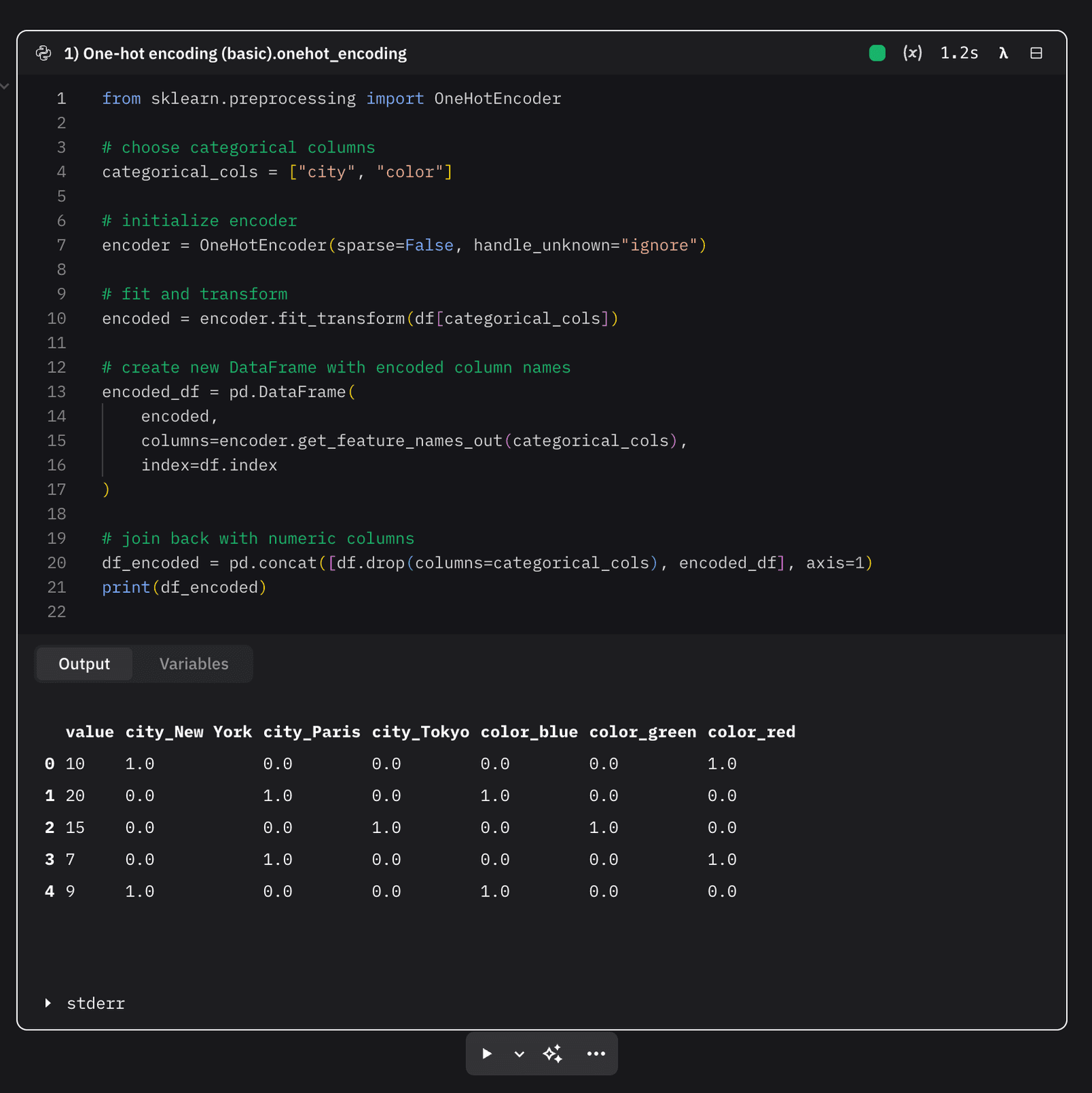
Here’s a link to some code showing how it works.
GroupBy Aggregations
A huge part of data science is turning raw events into meaningful features. For example, a transaction log might have one row per purchase, but most models don’t want raw events-they want summaries per customer. That’s where groupby comes in.
With groupby, you can collapse many rows into a single row per entity (like a customer, user, or product) and compute useful statistics: total spend, average transaction size, number of visits, time since last activity, and more. These become the features that describe behavior.
The key is to do this in a vectorized way, using pandas’ built-in agg, transform, shift, and boolean masking. That way, you avoid slow Python loops and instead leverage efficient C-level operations. The result is faster code that scales to millions of rows.
Some common patterns include:
Basic aggregations: sum, mean, count, min/max dates.
Recency and frequency: time since last event, number of events in the past 30 days.
Custom metrics: percentiles (p95 spend), distinct active days.
Row-level enrichments: attaching each customer’s total spend back to every transaction with transform.
These kinds of aggregations show up everywhere: churn prediction, credit scoring, recommendation systems, anomaly detection. The logic is the same-group the data by entity, compute the signals, and feed those signals into your model.
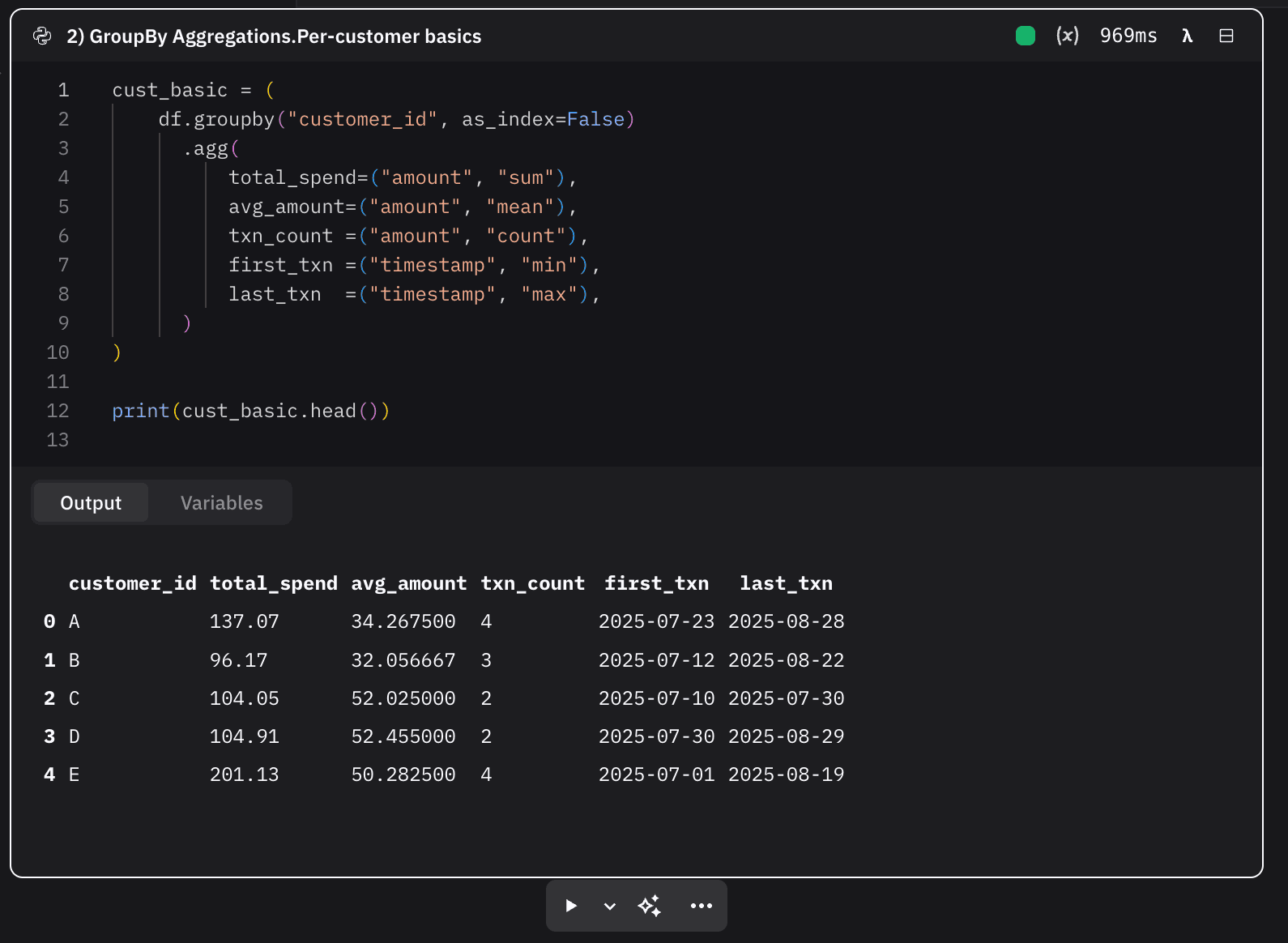
Here’s a link to some code showing how it works.
Sometimes you need preprocessing steps scikit-learn doesn’t ship. A custom transformer lets you keep those steps inside a clean Pipeline, using the same fit/transform API as built-ins.
Our existing LogStandardizeTransformer is the pattern: it applies log1p to reduce skew, optionally standardizes (z-score), can clip extremes, and supports inverse_transform and get_feature_names_out.
How it works step-by-step to defining a custom transformer
Subclass the sklearn bases: Create a class that inherits BaseEstimator and TransformerMixin. This makes your object compatible with Pipeline, cloning, and grid search.
Define init with only hyperparameters: Store options like standardize, clip_stds, and dtype. Do not touch data here. Keep arguments simple so set_params/get_params work.
Normalize inputs consistently: Add a small helper (like tonumpy_2d) to coerce Series/DataFrames/arrays into a 2D NumPy array. This keeps fit and transform logic clean and consistent.
Implement fit(X, y=None) to learn parameters
Coerce to array.
Apply log1p to a non-negative version of X (e.g., np.clip(X, 0, None)).
If standardizing, compute and store mean_ and std_ (replace zeros in std_ with 1 to avoid division by zero).
Optionally record feature_names_in_ from a DataFrame.Return self.
Implement transform(X) to apply the learned mapping
Coerce input, apply the same log1p step.
If standardizing, use the stored mean_/std_ from fit.
If clipping is enabled, np.clip to ±clip_stds.
Return a 2D NumPy array (use the configured dtype).
(Recommended) Implement inverse_transform(X)Undo standardization, then apply expm1. Floor tiny negatives at 0 for numerical stability. This is invaluable for debugging and interpretation.
(Recommended) Implement get_feature_names_out(...)Return meaningful column names based on inputs plus suffixes (e.g., __log1p_z or __log1p_z_clip3sd). This makes downstream inspection and export much clearer.
Use it exactly like a built-in
Standalone: t.fit_transform(df[["sessions"]]), print a few rows, and sanity-check with inverse_transform.
Pipeline: wrap with imputers and models.
ColumnTransformer: apply to numeric columns while one-hot encoding categoricals.Because it follows sklearn’s API, it slots into GridSearchCV/cross_val_score without extra work.
That’s the whole pattern: put all data-dependent logic in fit, reuse it in transform, and keep the interface identical to sklearn’s transformers so it composes cleanly with the rest of your workflow.
Here is some code showing how it works:
SQL-in-Pandas (Window Functions)
Window functions are a way to calculate values across a set of rows that are “related” to the current row. In SQL, you’ll see them with syntax like AVG(sales) OVER (...) or RANK() OVER (...). Unlike a regular GROUP BY-which collapses many rows into one-window functions let you keep the original rows while adding extra columns that show rolling averages, ranks, lags, or cumulative totals.
The idea is:
Partition the data (e.g., group by store).
Order the rows within that partition (e.g., by date).
Apply a function across that ordered window (e.g., rolling average sales).
In pandas, you recreate these patterns with tools like groupby, transform, rolling, and shift.
The Importance of Recognizing Patterns
Many analysts come to data science with a SQL background. Window functions are second nature in SQL but often confusing to translate into Python. Once you see the mapping-OVER maps to groupby + transform, LAG maps to shift, rolling windows map to rolling-you can use pandas for the same kinds of features.
These patterns are everywhere:
Customer analytics: recency, frequency, spend trends.
Finance: moving averages, year-over-year comparisons.
Ranking problems: leaderboards, top-N selections.
If you can think in window functions and code them in pandas, you can move seamlessly between SQL and Python environments.
Here is some code showing how it works
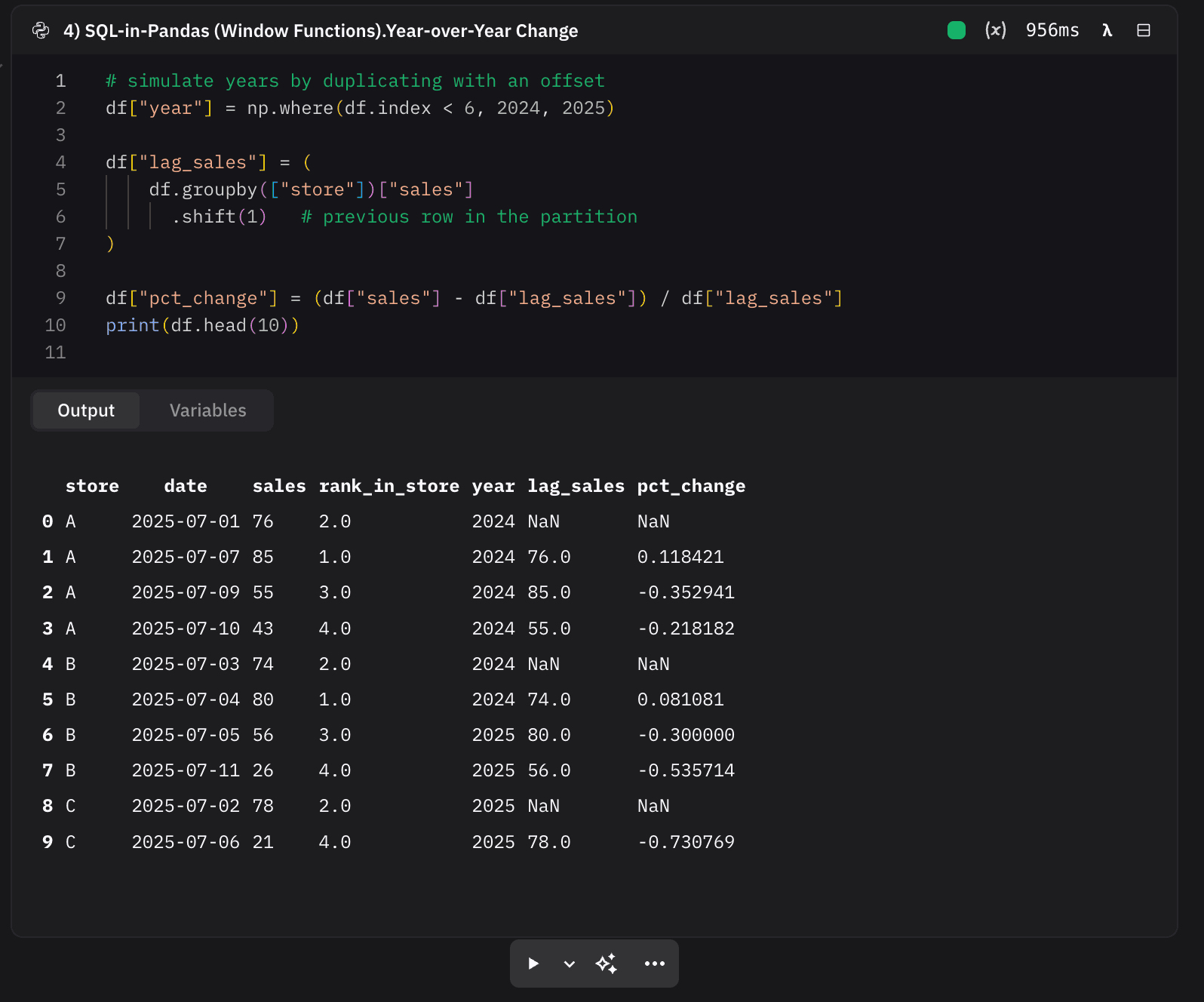
And since this example is running in Zerve, you actually don’t have to rewrite your SQL at all-Zerve supports language interoperability, so you could just write the same rolling average, rank, or lag directly in SQL, then pass the results along to Python for the rest of your workflow.
Custom Loss Functions
Most models optimize for a standard statistical loss, mean squared error for regression, and cross-entropy for classification. That works well in many situations, but in real business problems the “true cost” of being wrong isn’t always symmetric.
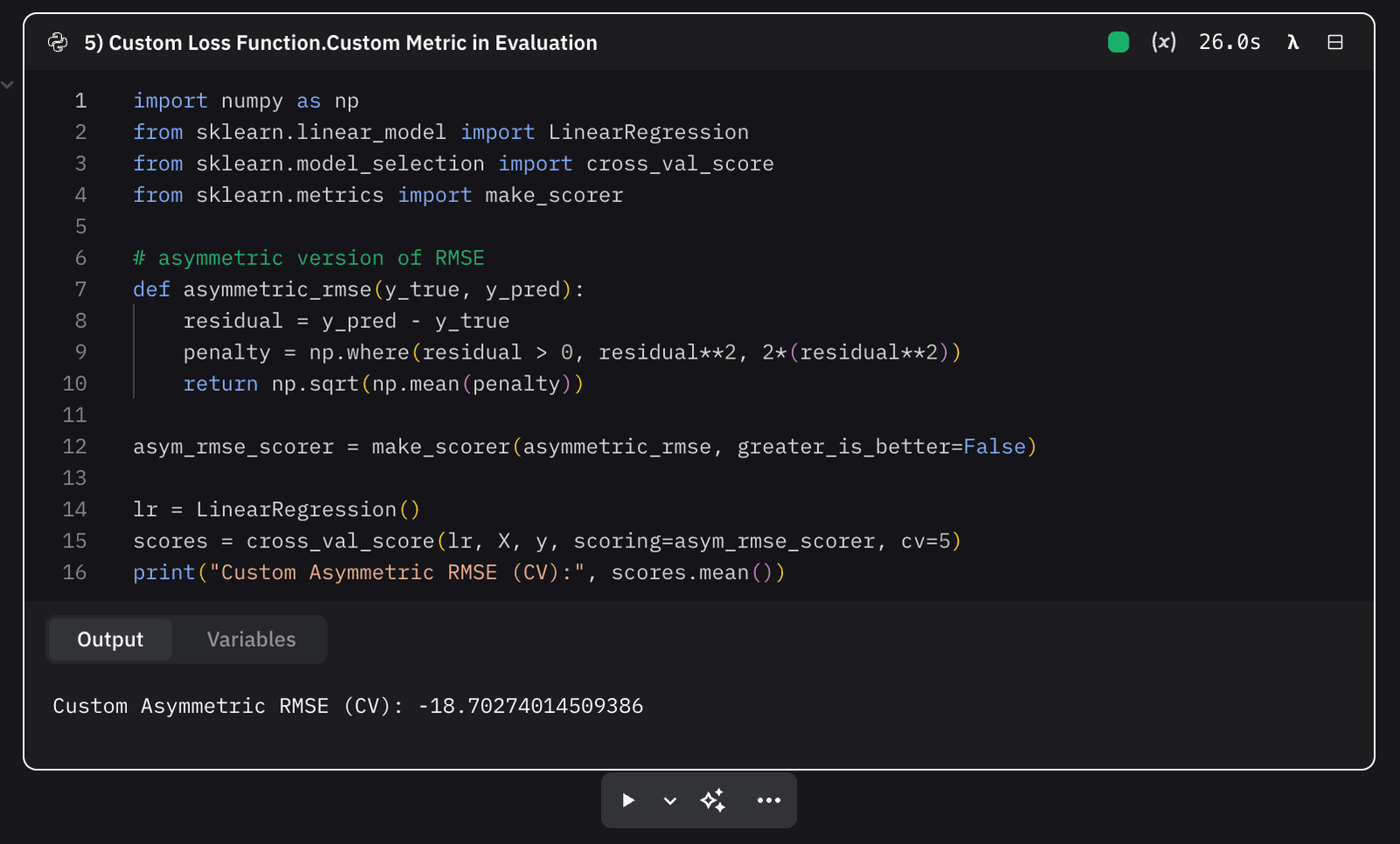
Take forecasting revenue as an example. If your model under-predicts, the business may under-stock and miss sales. If it over-predicts, you might just carry extra inventory. Underestimates are more damaging than overestimates, but a standard mean squared error loss treats them as if they were equally bad.
That’s where custom loss functions come in. They let you change the rules so that your model minimizes the kinds of errors that really matter for the problem you’re solving.
How Custom Loss Functions Get Defined
Conceptually, defining a custom loss is straightforward:
Identify the errors you care about. Decide which mistakes should be penalized more heavily-under-predictions, false negatives, large deviations, etc.
Translate that into math. Start with a base loss (like MSE or log loss) and add weights, asymmetries, or extra penalties. For example: double the squared error if the model underestimates, leave it unchanged otherwise.
Hook it into the framework.
In gradient boosting libraries like XGBoost or LightGBM, you supply custom formulas for the gradient and hessian, which the optimizer uses to update trees.
In scikit-learn, you usually provide a custom scoring function via make_scorer so that cross-validation and grid search pick models according to your custom metric.
In other words, instead of saying “all errors count the same,” you redefine the loss so it matches the real-world costs.
Bridging The Gap
Custom losses bridge the gap between statistical fit and business reality. They’re the difference between building a model that looks good on paper and one that actually makes better decisions in practice. By encoding domain knowledge into the optimization itself, you push the model to prioritize the outcomes that really matter-whether that’s avoiding costly underestimates, reducing false negatives, or minimizing the worst-case errors.
Here is some code showing it working.
Vectorization Challenge
A lot of data scientists start out writing Python loops. Loops are easy to understand, but they’re slow when you scale up to millions of rows. NumPy is designed to avoid those loops by pushing the heavy lifting into fast, compiled operations.
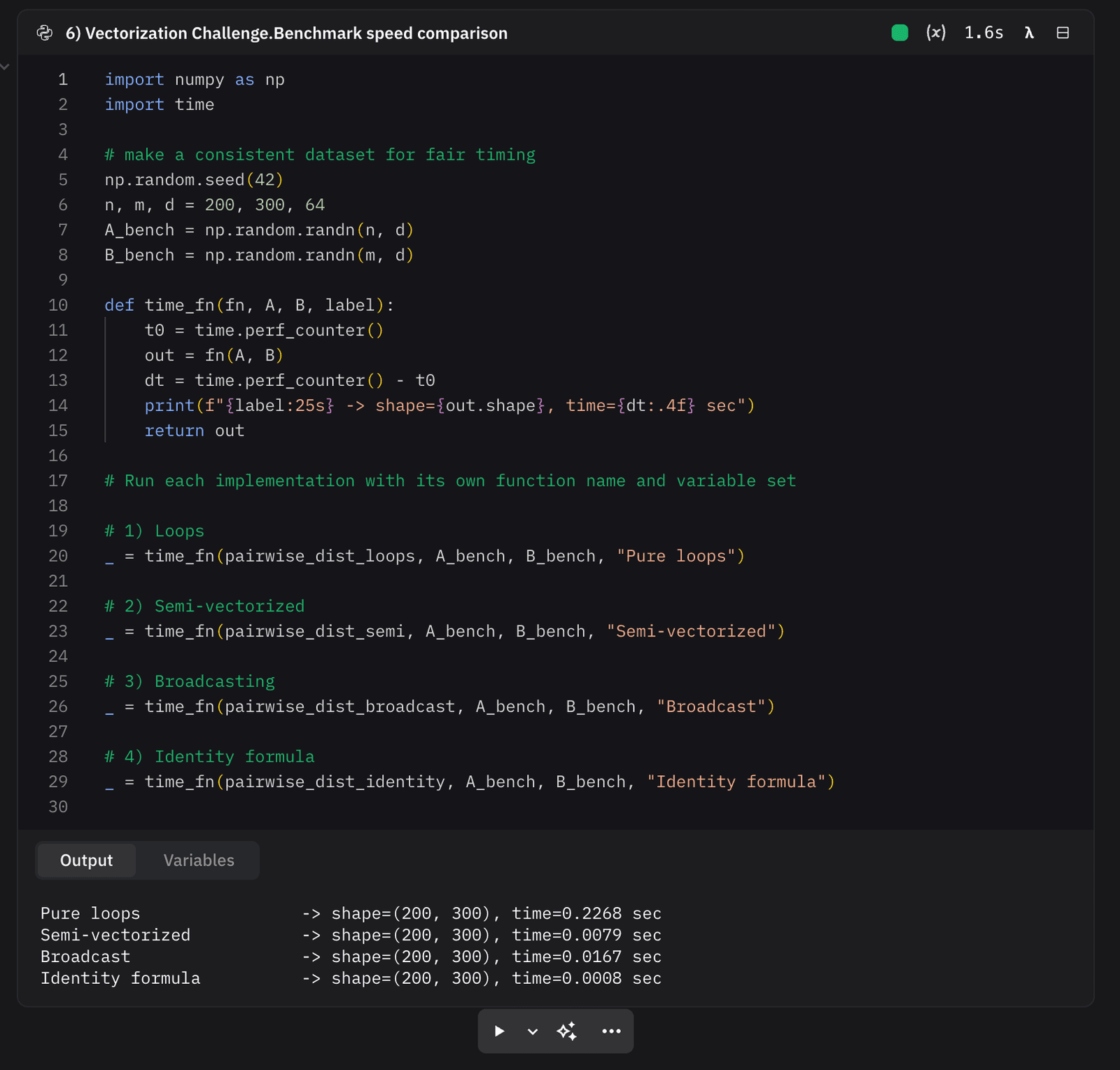
To see this in action, we used the simple task of computing all pairwise Euclidean distances between two sets of vectors. That means, for every row in A and every row in B, we want the distance between them.
We implemented it four ways:
Pure Python loops – easy to read but painfully slow.
Semi-vectorized – loop on one axis, NumPy math inside.
Full broadcasting – create a 3D array of differences and collapse with einsum.
Norm identity – use the formula |a-b|² = |a|² + |b|² – 2a·b to avoid big temporaries.
What You’d Expect to Happen
Correctness: All four methods produce exactly the same results (you can check with np.allclose). That gives confidence that the vectorized code isn’t changing the math.
Performance:
The loop version gets very slow as soon as n and m hit the hundreds.
The semi-vectorized version is much faster, but still has a Python loop.
The broadcast version is extremely fast, but builds a big (n, m, d) array in memory.
The norm identity version is both fast and memory-efficient, and is usually the sweet spot for real work.
Scaling intuition: once you see the speedup, you start to recognize that any nested loop over rows can probably be rewritten as a vectorized operation.
Why Learn Vectorization
Vectorization is one of the biggest practical skills for data scientists. It’s not just about making code “faster” - it’s what allows you to work on large datasets at all. Code that takes 30 minutes with Python loops can often run in a few seconds with NumPy, simply by thinking in terms of whole arrays instead of row-by-row operations.
The habit to build is:
Write the naive loop once to get the logic right.
Check the result against a vectorized version.
Use the faster version going forward.
That workflow keeps your intuition grounded while giving you production-ready performance.
Here’s a code example of this working.
Combining it All Together
We’ve walked through six coding techniques that range from the basics of one-hot encoding to the speedups of full NumPy vectorization. The examples aren’t just toy problems-they highlight skills every data scientist uses in practice: transforming categorical data, aggregating events, building custom pipeline steps, translating SQL logic into pandas, aligning models with business goals through custom loss functions, and writing efficient code that scales.
Each section showed not only how to do the task, but why it matters. And since the code is available in public Zerve canvases, you can explore it directly, tweak it, and see how the pieces fit together in your own workflows.
Frequently Asked Questions
Turning categories into numbers without proper encoding can mislead your model by implying an unintended order or magnitude, such as treating 'green' as greater than 'red'. Proper categorical encoding methods like one-hot encoding help avoid this pitfall and improve model accuracy.
GroupBy operations allow you to aggregate and summarize data effectively. For example, you usually cannot model raw event data directly. These operations help transform detailed data into meaningful features that models can work with more efficiently.
'Thinking in Windows' refers to using window functions that operate over a set of table rows related to the current row. If you're used to SQL, embracing window functions in your data science workflow enables more powerful and flexible analyses, such as running totals or moving averages.
Writing transformers encapsulates repetitive preprocessing steps into reusable components. This not only saves time but also ensures consistency and maintainability across projects when dealing with recurring data transformation needs.
Instead of relying solely on traditional metrics like mean squared error (MSE), consider multiple evaluation criteria and the specific context of your problem. Different metrics may capture different aspects of model performance, leading to better-informed decisions.
Vectorizing computations means replacing explicit loops with optimized array operations using libraries like NumPy. This approach significantly speeds up processing times because vectorized operations are executed at a lower level, making your data science workflows much more efficient.